By
In this guide
- Key Takeaways
- 1. Give Viewers a Reason to Watch You
- 2. Choose the Right Games to Stream
- 3. Create a Recognisable Twitch Brand
- 4. Prioritise Audio Quality Over Expensive Equipment
- 5. Establish a Consistent Streaming Schedule
- 6. Keep Talking, Even When Nobody Is Chatting
- 7. Write Better Stream Titles
- 8. Grow Your Audience Outside Twitch
- 9. Build a Community, Not Just a Follower Count
- 10. Network With Other Streamers Naturally
- 11. Use Twitch Analytics to Improve Your Streams
- 12. Avoid Common Twitch Growth Mistakes
- A 30-Day Twitch Growth Plan
- Frequently Asked Questions
- Final Thoughts
Starting a Twitch channel is relatively easy. Building an audience that regularly returns to watch your streams is considerably more challenging.
With countless creators broadcasting everything from competitive gaming and speedruns to casual conversations and creative projects, simply going live is rarely enough to stand out. Successful streamers combine entertaining content, community engagement, consistent branding and effective promotion.
Fortunately, you don't need an expensive gaming setup, professional-level gaming skills or an existing social media following to get started. You do, however, need a strategy.
Whether you're streaming to an empty chat or looking to take an established channel to the next level, this guide explains how to grow on Twitch and build an audience that genuinely enjoys your content.
Key Takeaways
- Choose a streaming niche that balances audience demand with competition.
- Prioritise clear audio, engaging commentary and reliable broadcasts.
- Maintain a realistic and consistent streaming schedule.
- Use short-form videos to attract viewers outside Twitch.
- Focus on returning viewers rather than follower counts alone.
- Review your channel analytics to understand what works.
- Avoid artificial engagement, excessive streaming hours and unnecessary equipment purchases.
1. Give Viewers a Reason to Watch You
One of the biggest challenges facing new Twitch streamers is answering a simple question: why should somebody watch your channel instead of another?
Playing a popular video game isn't necessarily enough. Hundreds of other streamers could be playing exactly the same title.
Your personality, knowledge, humour, creativity or approach to gaming can all help distinguish your channel.
Potential streaming niches include:
- Competitive gameplay and educational commentary.
- Retro gaming and nostalgic playthroughs.
- Horror games with entertaining reactions.
- Speedrunning and unusual gaming challenges.
- Relaxed, cosy gaming sessions.
- Achievement and trophy hunting.
- Community multiplayer events.
- First-time playthroughs of classic games.
You don't necessarily need to restrict yourself to one game. However, maintaining a recognisable theme helps viewers understand what they can expect when they return.
A streamer known for entertaining challenge runs can potentially move between multiple games without completely changing their channel's identity.
2. Choose the Right Games to Stream
Many new streamers assume that broadcasting the most popular games will automatically attract more viewers. In reality, highly competitive categories can make discovery particularly difficult.
Games such as Fortnite and Minecraft attract substantial interest, but they can also have large numbers of broadcasters competing for attention.
Less crowded categories may offer better opportunities for smaller creators.
| Game category | Advantages | Disadvantages |
|---|---|---|
| Major competitive games | Large potential audience | Heavy competition |
| Newly released games | Increased public interest | Demand may decline quickly |
| Retro games | Dedicated communities | Smaller overall audience |
| Indie games | Potentially less competition | Unpredictable viewer demand |
| Variety gaming | Greater creative freedom | Harder to establish audience expectations |
| Niche multiplayer games | Strong community connections | Limited potential audience |
Real-world example: Twitch streamer Chloeyummyyy jumped into the Grand Theft Auto VI category in the game’s launch week with a numbered, day-by-day series (“GTA 6 day 6”). Pairing a brand-new release with a recurring format and a talkative, interactive style gives viewers a reason to come back for the next episode, and around 1,250 people were watching when we tuned in.
Before choosing a game, browse its Twitch category and examine how viewers are distributed between channels.
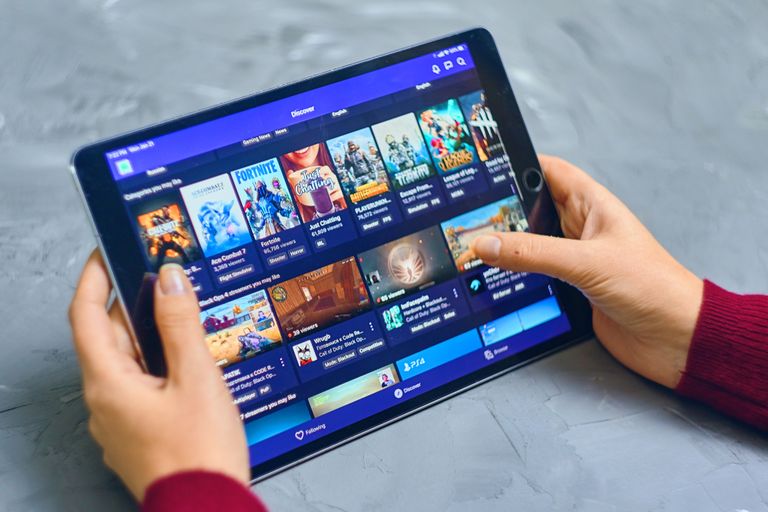
Are thousands of viewers concentrated around two or three major streamers? Are smaller channels attracting meaningful audiences? Does the game have an active community beyond Twitch?
Twitch's own analytics can also help you research categories and identify potential streaming opportunities.
Most importantly, choose games you genuinely enjoy. Streaming something purely because it appears popular can quickly become exhausting.
3. Create a Recognisable Twitch Brand
Your channel's appearance should communicate what you offer before a visitor even watches your stream.
A professional channel doesn't need elaborate graphics or expensive animations. Consistency and clarity are more important.
Start with:
- A memorable channel name.
- A recognisable profile picture.
- A simple, descriptive biography.
- A consistent colour scheme.
- Relevant social media links.
- A visible streaming schedule.
- Clear community rules.
Your username should ideally be easy to pronounce, remember and search for.
Avoid unnecessarily complicated spelling, excessive numbers and names that closely resemble established creators.
If you're struggling to find a suitable name, GamerBolt's free Twitch Name Generator can help you explore ideas based on your personality, preferred games and streaming style.
Example Twitch biography
Relaxed gaming, ridiculous challenges and community multiplayer nights. Live every Tuesday, Thursday and Sunday. Everyone's welcome!
A short description like this immediately communicates the channel's personality, content and schedule.
4. Prioritise Audio Quality Over Expensive Equipment
You might have an impressive gaming PC capable of producing beautiful graphics, but viewers are unlikely to stay if your microphone constantly crackles or your commentary is drowned out by game audio.
Clear sound should be one of your first priorities.
A basic streaming setup typically includes:
- A PC, console or other compatible streaming device.
- A reliable internet connection.
- A microphone or gaming headset.
- Broadcasting software, where required.
- A webcam, if you want to appear on camera.
OBS Studio is a popular free broadcasting application that offers extensive control over stream layouts, audio sources and video settings.
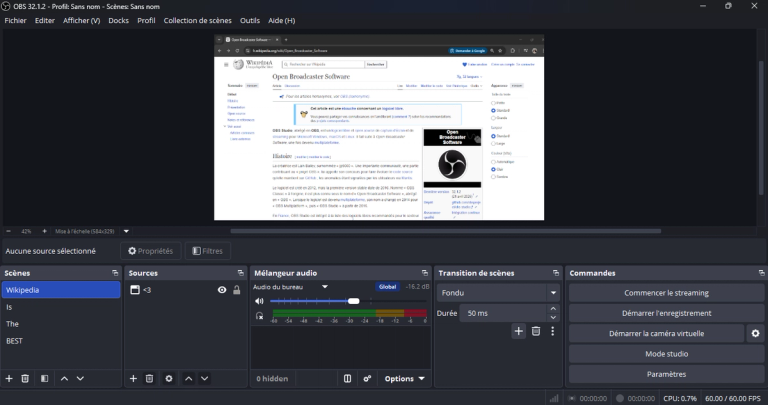
Before going live, make a short test recording and listen to it.
Check whether your voice is clearly audible, whether background noise is distracting and whether your game volume changes dramatically between different scenes.
Which streaming upgrades should you prioritise?
| Upgrade | Priority |
|---|---|
| Clear microphone audio | Very high |
| Stable internet connection | Very high |
| Smooth gameplay capture | High |
| Basic lighting for facecam streams | Medium |
| Better webcam | Medium |
| Custom animated overlays | Low |
| Dedicated streaming PC | Low for most beginners |
A reliable, enjoyable stream with modest equipment is preferable to an expensive setup that regularly experiences technical problems.
5. Establish a Consistent Streaming Schedule
Consistency gives viewers an opportunity to incorporate your streams into their routines.
If you broadcast at completely unpredictable times, even people who enjoy your content may struggle to catch you live.
However, consistency doesn't mean streaming every day.
Three well-planned broadcasts each week can be more sustainable and productive than seven lengthy streams with little preparation.
An example weekly schedule might look like this:
| Day | Activity |
|---|---|
| Monday | Edit and publish streaming highlights |
| Tuesday | Main gameplay stream |
| Wednesday | Community engagement and content planning |
| Thursday | Challenge or competitive stream |
| Friday | Publish short-form gaming content |
| Saturday | Rest or optional community event |
| Sunday | Main stream and weekly performance review |
Use Twitch's built-in scheduling features to communicate when viewers can expect your next broadcast.
Try different times and monitor the results. The best streaming time depends on your target audience, time zone, gaming category and personal availability.
There is no universally perfect time to go live.
6. Keep Talking, Even When Nobody Is Chatting
Streaming to zero viewers can feel uncomfortable, particularly when you're getting started.
However, remaining silent until somebody sends a message can make it more difficult to retain new visitors.
People often enter a stream, watch briefly and decide whether to stay without ever participating in chat.
Practise talking naturally while you play.
You could explain:
- Why you're making a particular decision.
- Your strategy for defeating a difficult boss.
- What you think about the game's mechanics.
- A funny experience from a previous gaming session.
- Your plans for the remainder of the stream.
Instead of silently navigating a difficult level, explain what you're attempting and why.
This makes the experience more entertaining and creates moments that can later be turned into video highlights.
Remember that quiet viewers are still valuable members of your audience. Never pressure somebody into chatting simply because they've joined your stream.
7. Write Better Stream Titles
Your stream title is an opportunity to generate curiosity and communicate what makes the broadcast interesting.
Generic titles often provide very little information.
| Weak stream title | Improved stream title |
|---|---|
| Playing Minecraft | Building an Entire Village Without Leaving Spawn |
| Fortnite Ranked | Can I Reach Unreal Using Only Random Loadouts? |
| Playing Skyrim | Completing Skyrim Without Fast Travel |
| Horror Games | Trying to Beat Three Horror Games Without Screaming |
| Just Gaming | Community Game Night – Come Join the Challenge |
An effective title gives viewers a reason to investigate further.
Use relevant tags, select the correct streaming category and avoid misleading clickbait. Delivering what your title promises helps establish trust with your audience.
8. Grow Your Audience Outside Twitch
One of the most common streaming mistakes is relying exclusively on Twitch for discovery.
Every hour you spend broadcasting can potentially produce entertaining, educational or memorable moments suitable for other platforms.
Consider publishing content on:
- YouTube and YouTube Shorts.
- TikTok.
- Instagram Reels.
- Relevant gaming communities.
- Your own website or blog, where appropriate.
Short-form videos can introduce your personality to people who have never encountered your Twitch channel.
Turn one stream into multiple pieces of content
Imagine you've just completed a three-hour gaming challenge.
That single broadcast could produce a short video showing a hilarious failure, an educational clip explaining your strategy, a longer YouTube highlight compilation and a memorable moment shared with your Discord community.
The objective is to make each piece of content entertaining or useful in its own right, rather than simply telling people to follow your Twitch channel.
Twitch also allows creators to feature selected clips for greater discovery opportunities within its own platform.
9. Build a Community, Not Just a Follower Count
Having thousands of followers means relatively little if very few of them return to watch your broadcasts.
A smaller, active community can provide a much stronger foundation for long-term channel growth.
Make your streams welcoming by remembering regular viewers, responding to comments naturally and creating opportunities for participation.
You could introduce:
- Community multiplayer sessions.
- Viewer-selected gaming challenges.
- Polls and interactive decisions.
- Monthly tournaments.
- Achievement challenges.
- Recurring themed broadcasts.
Creating a Discord server can also help your audience remain connected when you're offline.
However, avoid creating too many channels, events or commitments before your community is large enough to support them. Start small and expand naturally.
Establish clear chat rules and use Twitch's moderation tools to prevent harassment, spam and disruptive behaviour.
The atmosphere you create is often just as important as the games you play.
10. Network With Other Streamers Naturally
Building relationships with other creators can introduce your channel to relevant communities while making streaming a more enjoyable experience.
Look for streamers who share similar interests, gaming preferences or community values.
Participate genuinely in their broadcasts, organise multiplayer sessions, collaborate on challenges or use Twitch's raid feature to introduce your audience to another creator.
Avoid joining other people's streams purely to advertise yourself.
Messages such as "I'm a streamer too, come follow me" are unlikely to create meaningful relationships and may violate individual channel rules.
The strongest collaborations tend to benefit both creators and provide something enjoyable for their respective audiences.
11. Use Twitch Analytics to Improve Your Streams
Growing a Twitch channel becomes easier to approach when you understand how your content performs.
The Twitch Creator Dashboard provides statistics that can help you evaluate individual broadcasts and longer-term channel performance.
Some particularly useful metrics include:
| Metric | What it helps you understand |
|---|---|
| Average viewers | Typical concurrent audience size |
| Peak viewers | The largest audience during a broadcast |
| Unique viewers | How many distinct viewers tuned in |
| Unique chatters | How many people actively participated in chat |
| New followers | How effectively streams attract new followers |
| Discovery sources | Where viewers found your content |
| Clip performance | Which moments attracted interest |
Review your performance over several weeks rather than drawing conclusions from a single broadcast.
For example, you might discover that your Thursday challenge streams consistently outperform your regular gameplay broadcasts. That could suggest your audience responds particularly well to structured objectives.
Twitch's analytics documentation explains the available reporting tools in greater detail.
Try changing one major variable at a time. Switching your games, streaming schedule, titles and content format simultaneously makes it harder to identify what influenced your results.
12. Avoid Common Twitch Growth Mistakes
Even enthusiastic creators can develop habits that limit their channel's potential.
Buying followers or viewers
Artificial engagement does not create a genuine audience. It also violates Twitch's policies and can result in account enforcement.
Avoid viewbots, purchased followers and coordinated follow-for-follow schemes. Focus on legitimate growth instead.
Streaming for too many hours
Long broadcasts aren't automatically better broadcasts.
If you're exhausted, distracted or struggling to remain entertaining, additional streaming hours may provide little value.
Spend some of that time editing clips, planning content and improving your channel instead.
Constantly watching your viewer count
Watching your audience size fluctuate throughout a broadcast can negatively affect your confidence and performance.
Consider hiding the live viewer count and reviewing your statistics after the stream has ended.
Copying successful streamers
Learning from established creators is useful. Attempting to replicate their personality, branding and content exactly is less effective.
Viewers already have access to the original creator. Give them something different.
Changing direction too frequently
Experimentation is healthy, but completely reinventing your channel every week can confuse your audience.
Give new formats sufficient time to demonstrate whether they work.
Monetising too aggressively
Subscriptions, donations and sponsorships can become valuable revenue sources, but constantly asking viewers for financial support can make a stream uncomfortable.
Concentrate on creating an enjoyable experience first.
A 30-Day Twitch Growth Plan
If you're unsure where to begin, follow this simple four-week plan.
| Week | Focus | Actions |
|---|---|---|
| Week 1 | Establish your channel | Complete your profile, test equipment, choose a niche and create a schedule |
| Week 2 | Improve your content | Experiment with titles, commentary and structured gameplay challenges |
| Week 3 | Increase discovery | Publish short-form videos, feature clips and connect with relevant creators |
| Week 4 | Review and refine | Examine analytics, identify stronger formats and adjust your schedule |
Set achievable objectives that you can directly control.
Rather than aiming to gain 500 followers in a month, aim to complete 12 well-prepared streams, publish 12 interesting clips and review your performance each week.
These activities help establish habits that support sustainable growth regardless of your starting audience.
Frequently Asked Questions
How do you grow on Twitch with zero viewers?
Choose a manageable streaming category, practise engaging commentary, establish a consistent schedule and publish content outside Twitch. Focus on attracting your first few genuine regular viewers rather than immediately pursuing large follower counts.
Is it better to stream every day on Twitch?
Not necessarily. Daily streaming may work for some creators, but it can also cause burnout and leave insufficient time for promotion and content preparation. A smaller number of high-quality broadcasts can be more effective.
Can you grow on Twitch without a webcam?
Yes. Many streaming formats work without a facecam, including educational gameplay, speedruns, creative broadcasts and VTubing. Engaging commentary and a distinctive channel identity can help compensate for the absence of a camera.
How long does it take to grow on Twitch?
There is no guaranteed timeline. Some creators establish an active community within months, while others spend years building their audience. Content quality, competition, promotion and audience retention all influence growth.
Is Twitch too saturated for new streamers?
Although Twitch is highly competitive, new creators can still attract audiences. Developing a distinctive format, targeting underserved communities and promoting content outside the platform can help improve discovery.
Do you need to be good at video games to become a successful streamer?
No. Exceptional gaming ability is only one form of entertainment. Humour, storytelling, educational commentary, interesting challenges and community interaction can all attract viewers.
Should small Twitch streamers play popular games?
Popular games can offer growth opportunities, but smaller channels may struggle to stand out in crowded categories. Assess audience demand and competition before deciding which games to stream.
Final Thoughts
Growing on Twitch is about more than pressing the go-live button and hoping somebody discovers your channel.
The most sustainable approach combines entertaining content, a recognisable identity, consistent broadcasts, effective promotion and genuine relationships with viewers.
You don't need the most expensive equipment or the largest following to make your streams worth watching. Start with what you have, identify what makes your content enjoyable and improve with each broadcast.
For more advice, gaming technology recommendations and creator insights, explore GamerBolt's live streaming guides.
You can also access free educational resources directly through Twitch Creator Camp.

Written by
Jessica ThompsonAs a dedicated gaming journalist with over five years of experience, I've immersed myself in the ever-evolving world of video games. Currently, I contribute to Gamerbolt.com and PS6news.com, where I cover the latest in gaming news, in-depth game reviews, and industry trends. At Gamerbolt.com, I've had the privilege of shaping content strategies, writing comprehensive articles, and engaging with a passionate community of gamers. My role involves not only crafting engaging narratives but also staying ahead of the curve with the latest gaming innovations and upcoming titles.