By
By 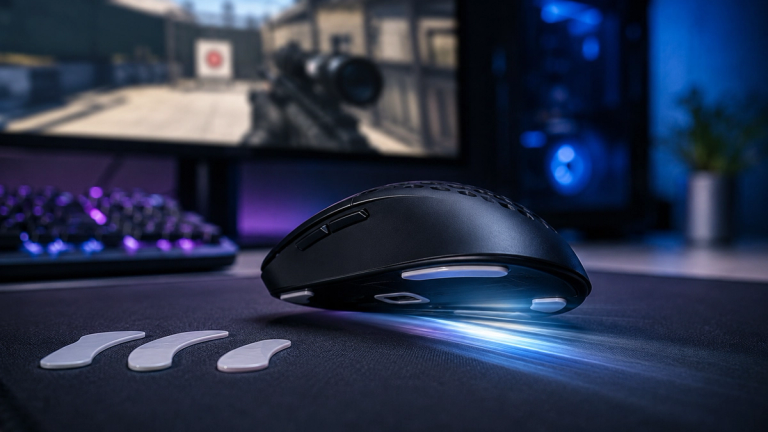
In this guide
Small upgrades to your gaming setup can have a noticeable impact on performance, and mouse skates are one such detail that can influence the way your mouse moves and feels. These pads, commonly made from materials like PTFE or UHMW-PE, help reduce friction between the mouse and the surface it moves on. The result is smoother movement, increased durability, and quieter operation. Gamers—whether they play casually or in competitive circumstances—can benefit from using mouse skates, as even small differences in glide can influence reaction times and comfort. They are also popular among users who want to customize every aspect of their setup for an edge or simply prefer the feel of effortless mouse movement. For those interested in understanding how mouse skates function or why they are widely used among gamers, this article outlines their advantages, factors to consider when choosing them, and tips for selecting the best option for your setup.
Why smooth glide and precision matter in gaming
For gamers, quick responses and precise control are crucial. The way your mouse glides impacts your ability to aim accurately and react swiftly during intense moments. When your mouse moves smoothly without hesitation or sticking, fine movements become easier to execute.
A consistent glide can be the deciding factor in high-pressure situations where precision is key, such as landing a critical shot or maneuvering in fast-paced scenarios. With reduced friction, the mouse responds more predictably across the whole pad. Replacing worn mouse skates is one of the cheapest ways to restore that feel without changing the mouse itself.
What to consider when choosing the right mouse skates
The main variations among mouse skates are material and thickness. Materials such as PTFE (polytetrafluoroethylene) and UHMW-PE (ultra-high-molecular-weight polyethylene) influence both friction levels and wear resistance. It’s important to check that the skates are compatible with your specific mouse model or that they offer a universal fit.
Different options may also offer enhancements like rounded edges or lower-noise composition, which some gamers may value for extra comfort or a quieter experience. Thickness is another factor to keep in mind, since it affects both the feel of the mouse and the sensor’s distance from the surface. Thinner pads keep the sensor closer to the pad and tend to feel more direct, while thicker ones add a little cushioning.
How to use mouse skates for optimal results
Installing new mouse skates typically involves removing any old pads, cleaning off residual adhesive from the base of the mouse, and applying the new ones as directed by included instructions. Most skate sets provide guidance tailored to various models for a secure fit.
Taking time during installation ensures that the skates sit flush with the base and do not interfere with sensor operation. Once installed, many notice a clear difference in how the mouse travels across surfaces like cloth pads or hard mats. Adjusting your settings after installing new skates may also help align your sensitivity preferences with the smoother glide. Regular cleaning and monitoring for wear will extend the life of the skates and maintain smooth operation. With regular maintenance and timely replacement as skates wear out, quality mouse skates can help maintain consistent performance throughout extended gaming sessions. Maintaining your mouse skates—such as cleaning accumulated dust or debris—will preserve their low-friction properties and protect your mousepad, making every movement as fluid and controlled as possible. Wired connections generally give the lowest latency, while modern 2.4 GHz wireless comes close in practice. Bluetooth is convenient for switching between devices, but it is used less often for competitive play because of higher latency.

Written by
Jessica ThompsonAs a dedicated gaming journalist with over five years of experience, I've immersed myself in the ever-evolving world of video games. Currently, I contribute to Gamerbolt.com and PS6news.com, where I cover the latest in gaming news, in-depth game reviews, and industry trends. At Gamerbolt.com, I've had the privilege of shaping content strategies, writing comprehensive articles, and engaging with a passionate community of gamers. My role involves not only crafting engaging narratives but also staying ahead of the curve with the latest gaming innovations and upcoming titles.