

In this guide
- Quick verdict: Is the ROG Xbox Ally X20 worth buying?
- ASUS ROG Xbox Ally X20: Full technical specifications
- Design and build quality: More than an anniversary paint job
- Display quality: The strongest reason to choose the X20
- Controls: TMR joysticks, transforming D-pad and improved triggers
- Gaming performance: How powerful is the Ryzen AI Z2 Extreme?
- Cooling and thermals: A genuinely useful improvement
- Battery life: How long does the Xbox Ally X20 actually last?
- Windows 11 and the Xbox handheld experience
- What games make sense on the Xbox Ally X20?
- Storage, connectivity and upgrade options
- ROG Xbox Ally X20 versus ROG Xbox Ally X
- ROG Xbox Ally X20 versus Steam Deck OLED
- Is the expensive anniversary bundle worth considering?
- Price and availability
- Frequently asked questions
- Final verdict: Premium handheld gaming comes at a premium price
- Sources and testing methodology
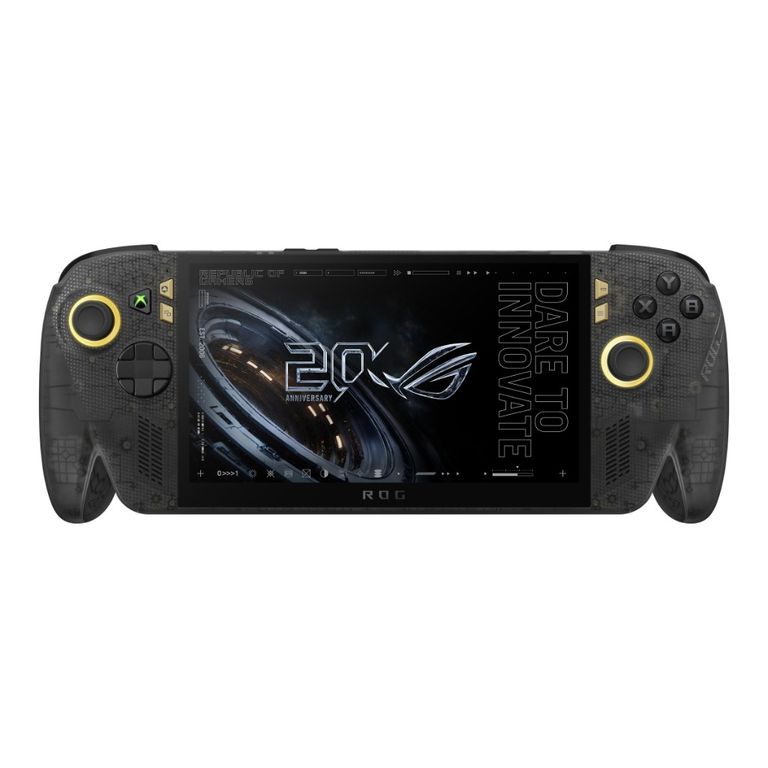
The ASUS ROG Xbox Ally X20 is one of the most ambitious Windows gaming handhelds of 2026. Built to celebrate 20 years of the Republic of Gamers brand, it combines a 7.4-inch OLED display, AMD's Ryzen AI Z2 Extreme processor, 24GB of memory, redesigned cooling and a distinctive translucent black-and-gold chassis.
On paper, it has nearly everything a premium handheld gaming PC should offer. Its 1080p OLED panel supports a 120Hz refresh rate, HDR, variable refresh rates and a claimed peak brightness of 1,400 nits. Upgraded controls include magnetic TMR joysticks, a transforming D-pad, redesigned triggers and comfortable rubberised grips.
But there is a substantial catch: the X20 costs £1,299.99 in the UK, and its gaming performance is broadly similar to the standard ROG Xbox Ally X.
This creates an unusual buying decision. You're paying considerably more for the experience surrounding the games, rather than significantly more raw performance.
So does the upgraded display, cooling and design justify the premium? We've examined ASUS's official hardware specifications alongside independent benchmark results from PC Gamer and Tom's Guide to establish what the X20 does well, where it falls short and who should actually consider buying one.
Editorial transparency: GamerBolt has not physically tested the ROG Xbox Ally X20. This assessment combines manufacturer-confirmed specifications with clearly attributed testing by independent publications. Reported performance and battery figures are not GamerBolt's own measurements.
Quick verdict: Is the ROG Xbox Ally X20 worth buying?
The X20 is a superbly equipped handheld in several important respects. Its OLED display represents a meaningful improvement over the LCD-equipped Xbox Ally X, while the redesigned controls, upgraded grips and cooler-running hardware address genuine concerns for portable gaming.
Its value proposition, however, is harder to defend.
Independent testing shows that the X20 generally performs within a similar range to the existing Xbox Ally X. More demanding games still require compromises in graphics settings, resolution or upscaling. The 80Wh battery is substantial, but it doesn't make the X20 an all-day gaming machine when playing demanding AAA releases.
Our editorial verdict: 8/10 for hardware and features; 6/10 for value.
These are GamerBolt's editorial assessment scores, not hands-on test scores.
What we like
- Excellent 7.4-inch, 120Hz OLED display with HDR and variable refresh rate support.
- Brighter screen and significantly improved black levels compared with the previous LCD model.
- Refined grips, controls, triggers and magnetic TMR joysticks.
- Improved cooling, supported by independent thermal testing.
- Windows 11 compatibility with major PC storefronts.
- 24GB RAM, 1TB SSD and modern USB4 connectivity.
- Distinctive 20th-anniversary styling.
What disappoints
- Extremely expensive for a handheld gaming PC.
- Relatively small real-world performance gains over the Xbox Ally X.
- Demanding games can still fall well below 60fps at higher settings.
- Battery endurance remains highly dependent on game and power profile.
- Windows can still require desktop-style interaction and troubleshooting.
- No advantage for owners of the previous model who primarily want more FPS.
Best suited to: Enthusiasts who value display quality, comfort, premium design and access to a broad Windows PC game library.
Less suitable for: Budget-conscious buyers, existing Ally X owners seeking a large performance upgrade or anyone expecting uncompromised 1080p AAA gaming at 120fps.
ASUS ROG Xbox Ally X20: Full technical specifications
The following specifications are taken from ASUS's official UK product listing.
| Component | Official specification |
|---|---|
| Model | ROG Xbox Ally X20 (2026), RC74XA |
| Operating system | Windows 11 Home |
| Processor | AMD Ryzen AI Z2 Extreme |
| CPU cores / threads | 8 cores / 16 threads |
| CPU clock | 2.0GHz base, up to 5.0GHz |
| CPU cache | 24MB |
| AI processor | AMD XDNA NPU, up to 50 TOPS |
| Display size | 7.4 inches |
| Display technology | OLED, ROG Nebula HDR |
| Resolution | 1920 × 1080 |
| Aspect ratio | 16:9 |
| Refresh rate | 120Hz |
| Adaptive refresh | AMD FreeSync Premium Pro |
| HDR support | Dolby Vision HDR |
| SDR brightness | 600 nits (manufacturer specification) |
| HDR peak brightness | 1,400 nits (manufacturer specification) |
| Colour gamut | 100% DCI-P3 (manufacturer specification) |
| Touchscreen | 10-point multitouch |
| Screen protection | Gorilla Glass Victus and DXC |
| RAM | 24GB LPDDR5X |
| RAM configuration | Onboard, dual-channel support |
| Storage | 1TB PCIe 4.0 NVMe SSD |
| SSD format | M.2 2280 |
| Expandable storage | microSD Express |
| Joysticks | Magnetic TMR, RGB lighting |
| Triggers | Hall-effect analogue triggers with impulse feedback |
| Additional controls | Transforming D-pad, 2 assignable rear buttons |
| Motion controls | 6-axis IMU |
| Speakers | Stereo speakers with Smart Amplifier |
| Audio | Dolby Atmos, Hi-Res headphone certification |
| Microphones | Built-in microphone array |
| Wireless networking | Wi-Fi 6E |
| Bluetooth | Bluetooth 5.4 |
| USB ports | 1 × USB4 Type-C, 1 × USB 3.2 Gen 2 Type-C |
| Other connections | 3.5mm audio, microSD Express |
| Battery | 80Wh, 4-cell lithium-ion |
| Power adapter | 68W USB-C specification |
| Security | Fingerprint reader, Microsoft Pluton |
| Weight | 756g |
| Dimensions | 300 × 121 × 27.5–51.3mm |
| UK ASUS listed price | £1,299.99 |
| US ASUS listed price | $1,299.99 |
Specifications and regional configurations can change. ASUS notes that charger inclusion varies by market and model. Confirm the retail package before purchasing.
Design and build quality: More than an anniversary paint job
The first thing separating the Xbox Ally X20 from ASUS's more conventional handhelds is its appearance.
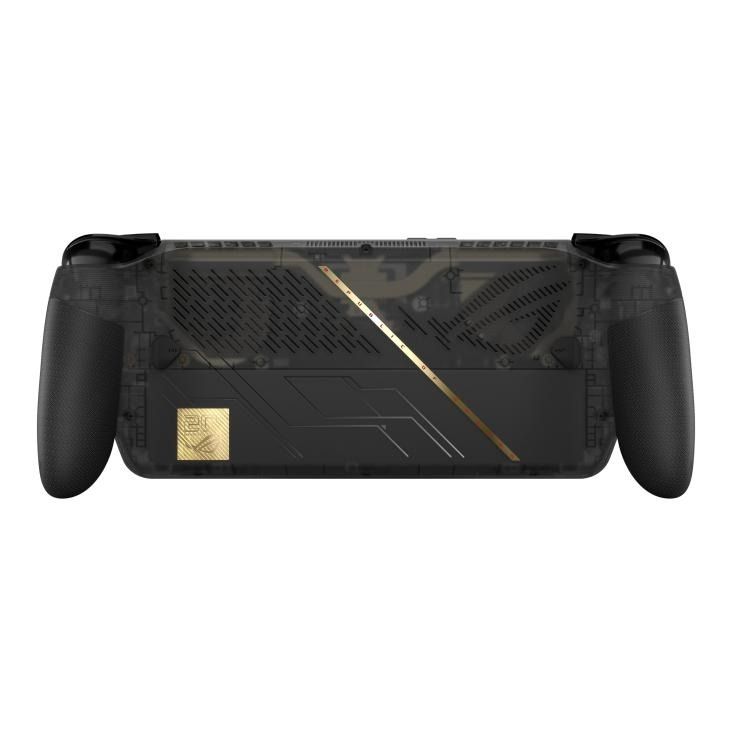
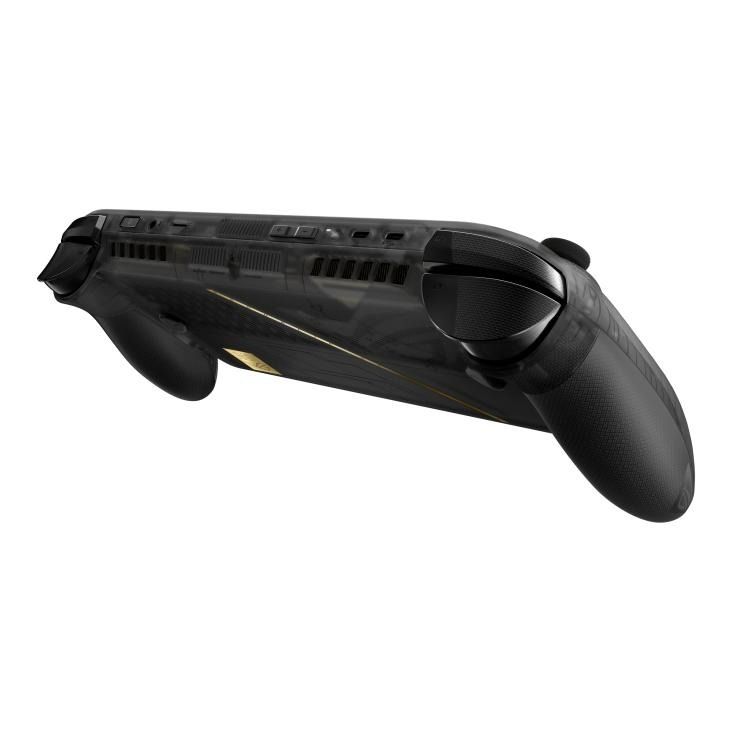
The translucent black chassis reveals elements of the internal construction, while gold details around the joysticks and rear casing commemorate the Republic of Gamers' 20th anniversary. The green illuminated Xbox button completes a design that feels distinctly different from the familiar white and black Ally models.
That anniversary branding might initially suggest a cosmetic special edition, but ASUS has also made functional changes.
The grips have a revised shape and a rubberised, anti-slip surface. The bumpers and triggers have been redesigned, the face buttons are more rounded, and the directional pad introduces a genuinely unusual mechanical feature.
At 756g, the X20 remains a substantial handheld. For perspective, Valve lists the 7.4-inch Steam Deck OLED at approximately 640g, making the ASUS roughly 116g heavier.
That extra weight may be less noticeable during short sessions when the grips support the hands effectively. During prolonged travel, however, weight remains a consideration, particularly if you tend to hold a handheld without resting your elbows.
Independent reviewers at PC Gamer and Tom's Guide both highlighted improved ergonomics as an important refinement over the previous Xbox Ally X.
The X20 therefore offers something more meaningful than an anniversary-themed shell, even though comfort will ultimately depend on individual hand size and preferences.
Display quality: The strongest reason to choose the X20
If there is one feature that fundamentally changes the X20 experience, it's the display.
The previous ROG Xbox Ally X uses a 7-inch IPS LCD panel. The X20 moves to a slightly larger 7.4-inch OLED screen with a 1920 × 1080 resolution and a maximum refresh rate of 120Hz.
That difference is about considerably more than the extra 0.4 inches.
OLED versus LCD
OLED pixels produce their own light, allowing individual pixels to switch off completely. This produces genuine black levels rather than the slightly illuminated blacks typical of LCD panels.
In practical terms, OLED is particularly appealing for dark environments, atmospheric horror games, brightly coloured independent titles and games with strong high-contrast effects.
The X20 also supports Dolby Vision HDR and carries VESA DisplayHDR True Black 1400 certification.
ASUS specifies 600 nits of SDR brightness and peak HDR brightness of 1,400 nits. These figures describe different operating conditions: users should not expect full-screen 1,400-nit brightness during ordinary desktop use.
HDR brightness also depends on supported content, Windows configuration and the area of the display being illuminated.
Why the 120Hz refresh rate matters
A 120Hz display can refresh its image up to 120 times per second. That potentially produces smoother motion than 60Hz, provided a game and its settings can deliver sufficiently high frame rates.
It's especially useful in less demanding games, competitive titles and fast-moving 2D games.
However, a 120Hz screen doesn't mean the X20 can run every new AAA game at 120fps. As the benchmarks later in this article demonstrate, some graphically demanding titles struggle to maintain 60fps, even with lower settings or upscaling.
Variable refresh rate and FreeSync Premium Pro
ASUS specifies a 30–120Hz variable refresh rate range.
Variable refresh rate (VRR) synchronises the display's refresh behaviour with the game's output, helping minimise tearing and reduce the visible judder associated with fluctuating frame rates.
That matters on a handheld, where a demanding game may fluctuate between 40fps and 60fps rather than maintaining one consistent target.
Anti-reflection treatment
ASUS also claims its display coating can reduce reflections by 65% compared with a standard untreated OLED panel under its stated comparison.
Although that shouldn't be interpreted as a guarantee of perfect outdoor visibility, it is a welcome design choice for a product designed for trains, holidays and everyday travel.
Display verdict
Based on its specifications and the published experiences of independent reviewers, the X20's screen is one of its clearest competitive advantages.
For buyers who prioritise image quality rather than raw frames per second, this may be enough to make the higher price worth considering.
Controls: TMR joysticks, transforming D-pad and improved triggers
The control hardware is another area in which ASUS has invested meaningfully.
TMR joysticks
The X20 uses tunnelling magnetoresistance (TMR) joystick sensors, a technology that measures movement magnetically without relying on a traditional sliding potentiometer contact.
This offers the potential for reduced mechanical wear and better long-term consistency.
ASUS claims a tight 3% dead zone and improved diagonal input behaviour.
However, even though magnetic sensors can avoid some common causes of traditional potentiometer drift, no joystick should be described as permanently immune to every possible form of drift or mechanical failure.
Transforming D-pad
One particularly interesting feature is the transforming directional pad.
ASUS says users can lift and rotate it by 90 degrees to change its input characteristics between four-way and eight-way control.
Four-way input can be preferable for certain retro games, while eight-way directional movement is useful in fighting games and titles requiring diagonal inputs.
For players who enjoy a wide range of genres, this is a thoughtful feature that distinguishes the X20 from an ordinary Xbox-style controller layout.
Triggers, buttons and haptics
The X20 includes Hall-effect analogue triggers with impulse feedback, revised shoulder bumpers, rounded ABXY buttons and two programmable rear controls.
It also supports a six-axis motion sensor.
Taken together, these changes show that ASUS has approached the X20 as a premium input device rather than simply attaching controller halves to a Windows PC.
For games such as Call of Duty: Modern Warfare 4, precise analogue controls and accessible rear buttons could be attractive, although game-specific compatibility and performance should always be verified rather than assumed.
Gaming performance: How powerful is the Ryzen AI Z2 Extreme?
The X20 is equipped with AMD's Ryzen AI Z2 Extreme, featuring eight CPU cores and 16 threads, with a specified boost clock of up to 5.0GHz.
It also includes an integrated AMD graphics solution and an XDNA neural processing unit capable of up to 50 TOPS of AI compute.
A crucial distinction is that the NPU's quoted AI throughput is not a gaming graphics benchmark. It does not translate into 50 TOPS of graphics rendering, nor does it independently guarantee higher frame rates.
The central question is how the X20 performs when playing actual PC games.
Independent gaming benchmark results
PC Gamer published direct testing against the earlier ROG Xbox Ally X. Its results show relatively small differences between the two handhelds.
The following figures are reproduced as a concise comparison of PC Gamer's published findings. They are not GamerBolt benchmarks.
| Game / test setting | Xbox Ally X | Xbox Ally X20 |
|---|---|---|
| Cyberpunk 2077, 1080p Medium, upscaling | 53fps | 58fps |
| F1 24, 1080p Medium | 84fps | 85fps |
| Horizon Zero Dawn, 1080p Original | 48fps | 51fps |
| Metro Exodus Enhanced, 1080p High | 27fps | 22fps |
Source: PC Gamer's Xbox Ally X20 vs Xbox Ally X comparison. Figures reflect that publication's test configuration and settings.
These figures demonstrate a clear pattern.
The X20 leads modestly in Cyberpunk 2077 and Horizon Zero Dawn, barely differs in F1 24 and actually performs worse in the reported Metro Exodus Enhanced test.
The Cyberpunk difference amounts to roughly a 9.4% increase in average FPS under the tested conditions. The F1 24 difference is approximately 1.2%.
This is not the consistent, substantial performance uplift that might be expected from buying an entirely new generation of hardware.
Equally important, average frame rates don't tell the entire story. Frame-time consistency and 1% lows can expose stutters that are not obvious from an average-FPS figure alone.
In PC Gamer's F1 24 test without upscaling, the X20 recorded a 61fps 1% low against 76fps on the earlier Ally X, despite delivering nearly identical average frame rates.
That result reinforces why buyers should be cautious about reducing performance to one headline FPS number.
What about newer, more demanding AAA games?
Tom's Guide tested the X20 at a 35W setting and reported the following results:
| Game / setting | Xbox Ally X20 |
|---|---|
| Black Myth: Wukong, 1080p Cinematic | 11fps |
| Cyberpunk 2077, 720p High | 11.87fps |
| Red Dead Redemption 2, 1080p Medium | 23fps |
| Shadow of the Tomb Raider, 1080p High | 31fps |
Source: Tom's Guide — ASUS ROG Xbox Ally X20 review. These represent specific demanding test presets, not the maximum frame rates attainable with optimised settings.
The results may look harsh, but they need context.
A handheld built around a relatively small integrated graphics processor should not be expected to deliver desktop GPU performance at demanding quality presets.
Lowering detail settings, using a lower internal render resolution and applying supported upscaling can often substantially improve playability.
The right conclusion isn't that the X20 cannot run demanding games. It's that buyers need realistic expectations about the combination of resolution, visual fidelity and frame rate they can achieve.
A game running poorly at a high preset may perform much better with a balanced or performance-oriented configuration.
Is 1080p or 720p better for handheld gaming?
The X20's native screen resolution is 1920 × 1080, but rendering every game natively at 1080p is not necessarily the best choice.
1080p contains approximately 2.07 million pixels per frame. By comparison, 1280 × 720 contains roughly 0.92 million pixels.
That means 720p has around 56% fewer pixels to render than 1080p.
The potential reduction in GPU workload can be significant, although real performance also depends on CPU limitations, graphics effects and game-engine behaviour.
For demanding titles, a lower internal resolution combined with supported upscaling may offer a more satisfying experience than struggling to maintain acceptable frame rates at native 1080p.
Our recommendation would be to prioritise stable frame pacing and sensible graphics settings rather than chasing the highest possible resolution.
Cooling and thermals: A genuinely useful improvement
While gaming performance may be similar to the earlier Ally X, the thermal results tell a more encouraging story.
ASUS redesigned the cooling system, introducing additional airflow routing and revised fan arrangements.
In PC Gamer's comparative thermal testing at a 35W plugged-in gaming setting, the results were:
| Thermal measurement | Xbox Ally X | Xbox Ally X20 |
|---|---|---|
| Maximum CPU temperature | 96°C | 79°C |
| Maximum CPU package power | 55W | 48W |
Source: PC Gamer. Measurements reflect its specific test conditions and should not be treated as universal operating temperatures.
The observed difference in maximum CPU temperature was 17°C.
That's meaningful.
Lower operating temperatures can help with sustained thermal management and may reduce the likelihood of temperature-related limitations under equivalent conditions.
However, these results don't independently establish lower fan noise or higher long-term component reliability. Those would require further controlled acoustic and endurance testing.
The X20 appears to offer a substantial cooling refinement even if it doesn't produce a correspondingly substantial FPS improvement.
Battery life: How long does the Xbox Ally X20 actually last?
ASUS equips the X20 with an 80Wh battery, an unusually substantial capacity for a handheld gaming system.
However, battery capacity is only one part of the equation.
Actual running time is influenced by processor power, display brightness, game complexity, wireless connectivity, background software and battery-management settings.
Independent results offer more useful guidance than broad manufacturer claims.
Published battery testing
PC Gamer reported the following PCMark 10 gaming battery-life results at its 25W test configuration:
| Device | Battery duration |
|---|---|
| ROG Xbox Ally X | 125 minutes |
| ROG Xbox Ally X20 | 149 minutes |
The X20 lasted 24 minutes longer in that particular test, an improvement of approximately 19%.
Tom's Guide separately recorded 2 hours and 47 minutes for the X20 in its gaming battery test.
The difference between these published results illustrates why battery figures should never be presented without their methodology.
A demanding game at high brightness and a more aggressive power profile may drain the battery considerably faster than a lightweight indie game running with reduced power consumption.
What does that mean for real use?
For a long train journey or flight, owners should plan around the possibility of needing external power during extended AAA gaming sessions.
Reducing screen brightness, limiting frame rates and selecting more efficient performance profiles may help extend operating time.
The OLED panel can also vary in power consumption depending on image content, making it difficult to assign one fixed battery benefit to the display upgrade.
Overall, the X20's battery endurance is respectable for its performance class, but buyers should not mistake an 80Wh specification for unlimited portable gaming.
Windows 11 and the Xbox handheld experience
The X20 runs Windows 11 Home rather than Xbox console firmware.
That distinction is fundamental.
The device offers an Xbox-oriented interface that makes controller navigation more practical, while continuing to support the flexibility of a Windows gaming PC.
The major advantage is access to multiple PC storefronts and ecosystems.
That can include Xbox PC games, Steam, the Epic Games Store and other compatible Windows applications.
Owners are therefore not limited to a single console storefront.
Can the X20 play Xbox games?
Yes, but compatibility depends on the specific game and how it is licensed.
Xbox Play Anywhere titles can support ownership across participating Xbox and Windows platforms, while PC Game Pass titles are available according to the user's subscription and the applicable PC catalogue.
Owning an Xbox console game does not automatically guarantee ownership of a Windows PC edition unless the title supports an appropriate cross-platform entitlement.
Similarly, the X20 should not be treated as an Xbox Series X or Series S in portable form.
It's a Windows PC with Xbox-oriented software.
What about Game Pass?
ASUS's UK specifications list an eligible two-month Xbox Game Pass Premium offer with the device.
Regional availability and subscription terms apply. ASUS also notes that continued billing and other membership conditions may apply, so buyers should read the applicable offer terms carefully.
The downside of Windows flexibility
Windows compatibility brings advantages, but it also introduces potential complications.
Some launchers require updates or account sign-ins. Some games aren't designed around handheld controls. Windows prompts and configuration screens can also be awkward without a keyboard and mouse.
The X20 provides additional touch controls and controller-focused software to reduce these frustrations, but it doesn't entirely remove them.
For players who already maintain a significant PC game library, the flexibility is a major benefit.
For those who simply want to turn on a device and play without configuration, a more console-oriented handheld may be more appealing.
What games make sense on the Xbox Ally X20?
The X20's best experiences are likely to vary considerably by genre and performance demands.
Competitive shooters
Fast-paced games can benefit from the 120Hz OLED display and precise analogue controls.
However, the system must actually generate sufficiently high frame rates to take full advantage of that refresh rate.
The approaching release of Call of Duty: Modern Warfare 4 makes shooter compatibility an obvious area for future testing.
GamerBolt would need verified performance data before recommending particular FPS targets or graphics configurations for that game.
Action RPGs
The OLED screen should be particularly appealing for games with cinematic lighting, atmospheric environments and strong colour contrast.
For example, Phantom Blade Zero launches on Windows PC on 29 October 2026.
Its published PC requirements provide a useful starting point for assessing hardware demands, but they don't establish actual X20 performance. A dedicated handheld benchmark would be needed once the game is available.
Indie and less demanding games
Smaller-scale PC titles can be an especially good match for premium handheld hardware.
They may offer high frame rates, reduced power consumption and more opportunities to appreciate the OLED panel without aggressive graphics compromises.
What about GTA 6?
This requires an important clarification.
Grand Theft Auto VI currently has an announced November 2026 launch for PlayStation 5 and Xbox Series X|S.
A Windows PC release has not been announced.
Therefore, there is no verified native PC version or X20 benchmark to discuss, and claims that the device will run GTA 6 at a particular resolution or frame rate would be speculative.
Storage, connectivity and upgrade options
The X20 comes with a 1TB M.2 2280 PCIe 4.0 SSD.
That provides a practical starting point for a mixed library of games, although the usable capacity will be lower after Windows, system software and formatting overhead are accounted for.
Large modern AAA games can consume substantial storage space, so users who install numerous titles simultaneously may eventually need additional capacity.
The inclusion of a microSD Express reader provides another storage option.
USB connectivity is also notably flexible.
The handheld includes two USB-C ports: one supporting USB4 and another supporting USB 3.2 Gen 2. DisplayPort and USB power delivery capabilities allow compatible accessories and external displays to be connected.
That makes a desktop-style setup possible using a suitable dock, monitor, keyboard, mouse and power adapter.
However, the X20's integrated graphics hardware remains the limiting factor for demanding gaming at high external display resolutions.
Connecting a 4K monitor does not mean the handheld can render modern AAA games at 4K with high settings and smooth performance.
ROG Xbox Ally X20 versus ROG Xbox Ally X
The most natural competitor to the X20 may actually be its own predecessor.
Both devices are premium Windows handhelds with powerful integrated AMD hardware, generous memory allocations and 80Wh batteries.
But the X20 brings several refinements:
| Feature | ROG Xbox Ally X | ROG Xbox Ally X20 |
|---|---|---|
| Screen | 7-inch IPS LCD | 7.4-inch OLED |
| Resolution | 1920 × 1080 | 1920 × 1080 |
| Refresh rate | 120Hz | 120Hz |
| HDR OLED experience | No | Yes |
| Memory | 24GB LPDDR5X | 24GB LPDDR5X |
| SSD | 1TB | 1TB |
| Battery | 80Wh | 80Wh |
| TMR joysticks | No | Yes |
| Transforming D-pad | No | Yes |
| Cooling system | Earlier design | Redesigned |
| Performance | Similar general class | Similar general class |
Comparison based on manufacturer specifications and independent testing. Consult individual model listings for regional configurations.
Should existing Ally X owners upgrade?
For most owners, probably not.
If the main goal is substantially better gaming performance, the X20 doesn't provide a sufficiently consistent improvement to make upgrading an obvious decision.
The stronger reasons to upgrade are the OLED display, revised controls, ergonomics, cooling and special-edition styling.
These are worthwhile improvements, but they come at considerable expense.
An existing Ally X owner who is satisfied with the screen and controls has relatively little reason to replace the device solely to gain more FPS.
ROG Xbox Ally X20 versus Steam Deck OLED
The Steam Deck OLED remains a particularly relevant alternative because it also prioritises screen quality and portable gaming.
Valve's handheld is built around SteamOS and a more console-like interface, whereas the ASUS uses Windows 11 and provides broader native support for conventional Windows PC software.
The X20 offers a 1920 × 1080, 120Hz OLED panel, while the Steam Deck OLED uses a 1280 × 800, 90Hz OLED display.
The ASUS also has a larger 80Wh battery versus the Steam Deck OLED's 50Wh battery, although capacity alone doesn't determine real-world endurance.
The Steam Deck OLED is lighter, at approximately 640g versus 756g for the X20.
Which makes more sense?
Choose the X20 if Windows compatibility, higher screen resolution, the 120Hz panel and premium controls are major priorities.
Consider the Steam Deck OLED if you place more importance on the SteamOS experience, lower weight and a less expensive entry into OLED handheld PC gaming.
The two devices are not interchangeable, particularly when considering launchers, anti-cheat systems and game-specific operating-system compatibility.
Valve's official Steam Deck technical specifications provide a useful independent reference when comparing the hardware.
Is the expensive anniversary bundle worth considering?
ASUS also offers an Xbox Ally X20 anniversary bundle.
The UK ASUS listing shows a price of £2,299.99, compared with £1,299.99 for the standalone handheld.
The bundle includes additional premium accessories, including ROG XREAL R1 Edition 20 glasses, a custom Pelican protective case and a dedicated dbrand Killswitch accessory.
These may be attractive to collectors or people interested in a large virtual display experience.
But the bundle should not be confused with a more powerful version of the X20.
The core gaming hardware specifications remain the same.
From a value perspective, the standalone model makes considerably more sense for most buyers who are primarily interested in handheld gaming.
The bundle is best viewed as an enthusiast or collector purchase rather than an essential upgrade.
Price and availability
The standalone ASUS ROG Xbox Ally X20 is listed by ASUS for:
| Market | ASUS listed price |
|---|---|
| United Kingdom | £1,299.99 |
| United States | $1,299.99 |
| UK anniversary bundle | £2,299.99 |
Prices and stock availability are subject to retailer and regional differences.
The product can be found through the official ASUS ROG Xbox Ally X20 UK product page.
At this price, the X20 faces serious competition from less expensive handhelds and from premium gaming laptops that may offer substantially greater graphics capability, albeit in a very different form factor.
Buyers should be confident that handheld convenience and display quality matter more to them than maximum performance per pound.
Frequently asked questions
Is the ROG Xbox Ally X20 more powerful than the Xbox Ally X?
Not substantially in the independent games tested so far. Published results show modest gains in some titles, near-identical results in others and occasional regressions.
The clearest improvements are the display, controls, cooling and physical design.
Does the Xbox Ally X20 have an OLED screen?
Yes. It features a 7.4-inch, 1920 × 1080 OLED display with a 120Hz refresh rate, HDR support and AMD FreeSync Premium Pro.
How much does the Xbox Ally X20 cost?
ASUS lists the standalone device at £1,299.99 in the UK and $1,299.99 in the United States.
Can the ROG Xbox Ally X20 run Steam games?
Yes. It runs Windows 11 and can access compatible Windows PC games through Steam and other supported storefronts.
Game compatibility and performance vary by title.
Is the ROG Xbox Ally X20 a real Xbox console?
No. It's a Windows gaming handheld with Xbox-oriented software and controller integration. It isn't an Xbox Series X or Series S, and it doesn't automatically run every console-exclusive game.
How long does the battery last?
Independent gaming tests have reported results including 149 minutes in PC Gamer's PCMark 10 test and two hours, 47 minutes in Tom's Guide's testing.
Actual play time depends on the game, power mode, brightness and other settings.
Does the Xbox Ally X20 support external monitors?
Yes. Its USB-C connections provide compatible display output capabilities, allowing use with external monitors and docks.
Can the storage be upgraded?
The device uses an M.2 2280 SSD and includes a microSD Express reader. Buyers considering internal SSD replacement should follow ASUS's service and compatibility guidance before opening the device.
Does it have Hall-effect joysticks?
The X20 uses TMR magnetic joysticks. Its analogue triggers use Hall-effect technology. These are related but distinct input technologies.
Is it suitable for competitive gaming?
Its 120Hz OLED display, precise controls and Windows compatibility make it an interesting option. Whether a particular competitive game reaches suitable frame rates depends on its graphics demands and configuration.
Should Steam Deck OLED owners upgrade?
Only if the additional performance potential, Windows compatibility, screen resolution or other X20-specific features justify the substantial extra cost. The Steam Deck OLED remains a strong option for players who prefer SteamOS.
Final verdict: Premium handheld gaming comes at a premium price
The ASUS ROG Xbox Ally X20 demonstrates just how sophisticated handheld gaming PCs have become.
Its display is a genuine highlight, combining OLED contrast, high refresh rates, HDR and a compact 1080p panel.
The improved controls are more than cosmetic, while independent thermal testing suggests that ASUS has made meaningful progress in controlling heat under sustained gaming loads.
The design is also unusually distinctive. As a 20th-anniversary product, the translucent chassis and gold detailing help it stand apart from an increasingly crowded handheld market.
Yet the biggest obstacle is impossible to ignore.
At £1,299.99, the X20 needs to offer a compelling reason to spend significantly more than the alternatives.
For enthusiasts who prioritise OLED quality, Windows game compatibility and carefully refined handheld controls, it provides that reason.
For gamers focused primarily on performance, the picture is less convincing. Independent benchmarks show relatively modest gains over the earlier Xbox Ally X, and demanding titles still need careful graphics optimisation.
The X20 is therefore better understood as a premium refinement of an established handheld formula than as a revolutionary leap in portable gaming performance.
Our recommendation: Consider the ROG Xbox Ally X20 if you want a top-tier OLED Windows handheld and are comfortable paying a significant premium for refinement. If you already own a capable handheld and mainly want dramatically higher frame rates, waiting or comparing alternatives is the more sensible option.
Sources and testing methodology
This research-based review was prepared using manufacturer specifications and the following published resources:
- ASUS ROG Xbox Ally X20 — Official UK technical specifications — hardware, dimensions, display, battery and pricing.
- ASUS ROG Xbox Ally X20 — Official feature overview — design, controls, display and cooling.
- PC Gamer — Xbox Ally X20 versus Xbox Ally X — comparative game benchmarks, thermals and battery life.
- Tom's Guide — ASUS ROG Xbox Ally X20 review — independent gaming benchmarks, battery testing and assessment.
- Valve — Steam Deck technical specifications — competitor specifications.
Testing disclosure: GamerBolt did not receive a review sample or perform original hardware benchmarks. Performance figures attributed to third-party publications should not be represented as original GamerBolt test results.

Written by
Jessica ThompsonAs a dedicated gaming journalist with over five years of experience, I've immersed myself in the ever-evolving world of video games. Currently, I contribute to Gamerbolt.com and PS6news.com, where I cover the latest in gaming news, in-depth game reviews, and industry trends. At Gamerbolt.com, I've had the privilege of shaping content strategies, writing comprehensive articles, and engaging with a passionate community of gamers. My role involves not only crafting engaging narratives but also staying ahead of the curve with the latest gaming innovations and upcoming titles.