

In this guide
- GameSir Tarantula 8K PC specifications
- Design: a PlayStation-style controller built for PC esports
- Does 8,000Hz polling actually matter?
- Gen-2 TMR thumbsticks: potentially the more important upgrade
- Dual-mode triggers: one controller for racing and shooters
- Microswitch face buttons and a mechanical D-pad
- Nine remappable controls: useful customisation or too many buttons?
- GameSir Connect: how much can players customise?
- What does the Tarantula 8K sacrifice?
- GameSir Tarantula 8K vs a conventional controller
- GameSir Tarantula 8K PC: pros and cons
- Who should buy the GameSir Tarantula 8K?
- Final verdict: is 8,000Hz the real reason to buy it?
- Frequently asked questions
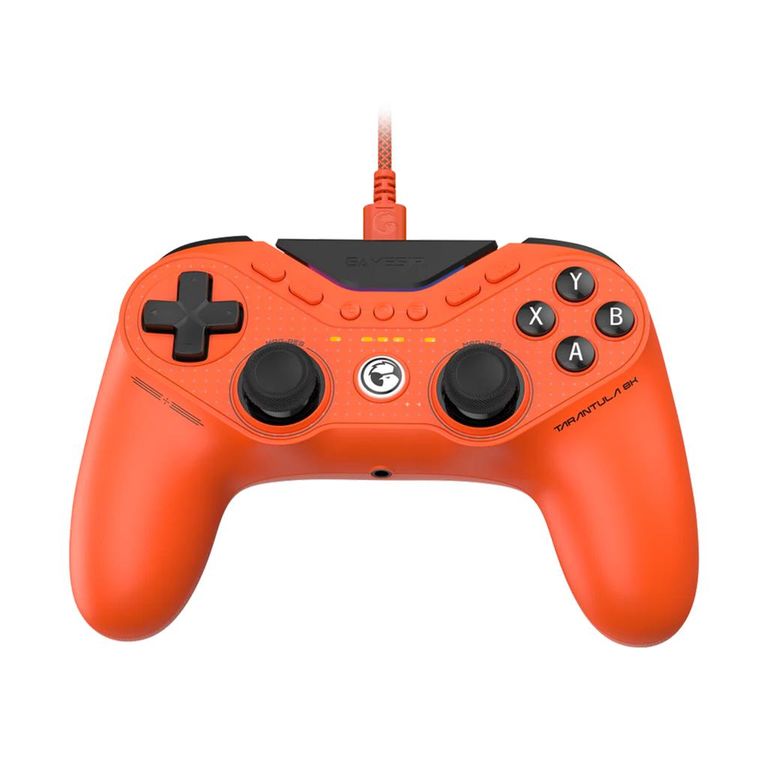
There's a point where gaming hardware specifications begin to sound almost absurd. Faster refresh rates, microscopic response times and increasingly precise sensors are all competing for attention. GameSir's Tarantula 8K PC enters that race with one particularly eye-catching headline: an 8,000Hz polling rate.
But does reporting controller inputs up to 8,000 times per second actually make games feel better?
That's the question worth asking about the GameSir Tarantula 8K PC. On paper, it combines several features normally associated with competitive gaming hardware: second-generation TMR thumbsticks, mechanical microswitch buttons, dual-mode triggers, a six-axis gyroscope and nine additional remappable controls.
It also makes some deliberate compromises. There's no wireless connectivity, no built-in battery and no vibration hardware. At approximately 180g, it's designed to prioritise lightweight handling and responsive inputs over the more immersive features found in conventional controllers.
With a launch price of around $69.99 in the US and £79.99 in the UK, the Tarantula 8K has the hardware to challenge considerably more expensive alternatives. The real question is whether those features make it a sensible upgrade for everyday players, not just competitive enthusiasts.
Disclosure: GameSir provided GamerBolt with the Tarantula 8K PC for editorial coverage. The manufacturer has not approved or controlled our editorial conclusions.
GameSir Tarantula 8K PC specifications
| Feature | Specification |
|---|---|
| Platform | Windows 10 / 11 PC |
| Connection | Wired USB-C |
| Maximum polling rate | 8,000Hz |
| Polling modes | 250 / 1,000 / 4,000 / 8,000Hz |
| Thumbsticks | GameSir Mag-Res Gen-2 TMR |
| Stick resolution | 4,096 levels, manufacturer-rated |
| Triggers | Hall Effect analogue / microswitch mode |
| Face buttons | Mechanical microswitch ABXY |
| D-pad | Mechanical, tactile |
| Extra controls | 9 remappable buttons |
| Macros | Up to 32 steps per supported macro |
| Motion sensor | Six-axis gyroscope |
| Lighting | Customisable RGB |
| Software | GameSir Connect |
| Vibration | None |
| Wireless | No |
| Weight | Approximately 180g |
| Launch price | $69.99 / £79.99 |
Specifications verified against GameSir's official product pages and FAQ. Features, software behaviour and regional pricing may change.
Design: a PlayStation-style controller built for PC esports
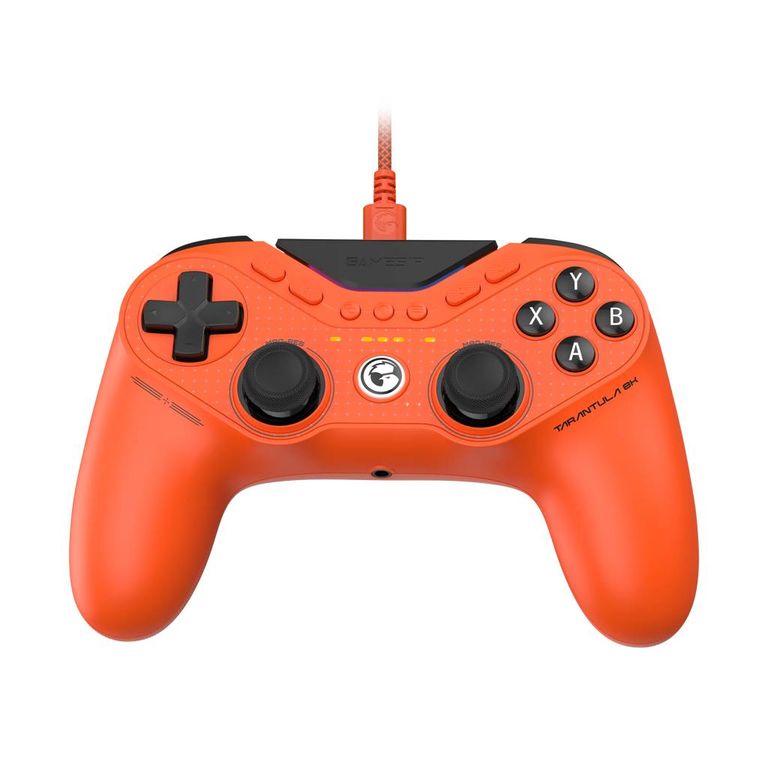
The Tarantula 8K follows a symmetrical thumbstick layout, immediately making it more familiar to players accustomed to Sony's DualShock and DualSense controllers than those who prefer the offset-stick arrangement of an Xbox gamepad.
Its bright orange finish makes it easy to recognise, while the familiar face-button and D-pad arrangement keeps the underlying design approachable.
The more interesting design decision is its weight.
At around 180g, the controller is exceptionally light compared with many conventional wireless gamepads. GameSir achieves this partly by removing the internal battery and vibration motors altogether.
That changes the character of the controller. Instead of trying to provide every possible feature, the Tarantula 8K focuses on the inputs themselves.
For competitive shooters, where some players already disable vibration to reduce distractions, the trade-off could make sense. For cinematic adventures, racing games and other experiences where force feedback contributes to immersion, the missing rumble is a more meaningful limitation.
The physical ergonomics also deserve consideration. Windows Central praised the controller's comfortable form and accessible rear buttons, although its reviewer found the grip texture relatively weak and the additional bumper controls rather close to the conventional bumpers.
It's a reminder that even a controller with excellent technical specifications still depends on straightforward details such as grip, button spacing and comfort.
Does 8,000Hz polling actually matter?
This is undoubtedly the Tarantula 8K's biggest selling point, but it's also the feature that needs the most explanation.
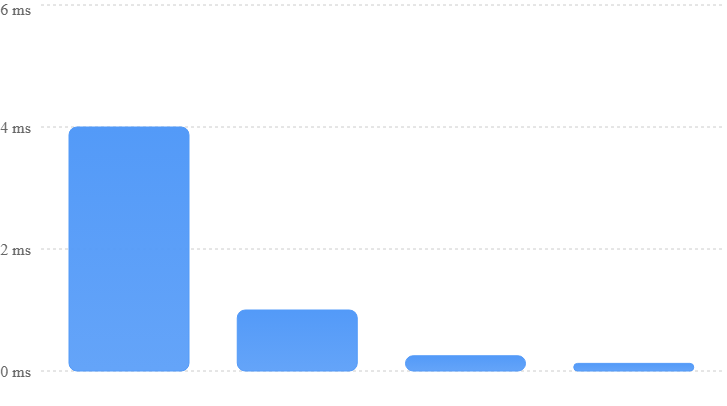
A controller's polling rate describes how frequently it can report its input state to a connected computer. At 8,000Hz, that corresponds to one report opportunity every 0.125 milliseconds.
Here's how that compares with slower settings.
| Polling rate | Interval between reports |
|---|---|
| 125Hz | 8ms |
| 250Hz | 4ms |
| 500Hz | 2ms |
| 1,000Hz | 1ms |
| 4,000Hz | 0.25ms |
| 8,000Hz | 0.125ms |
These intervals are mathematical values, not measurements of total controller-to-screen input latency.
That distinction matters.
GameSir advertises a latency figure of 0.25ms on its Tarantula 8K product page, but the manufacturer has also used different response-time figures in related promotional and support materials. Without a clearly defined measurement method and independent end-to-end latency testing, these figures should not be treated as guaranteed performance in actual games.
Why a faster polling rate doesn't automatically mean better gameplay
At 1,000Hz, the controller already has an opportunity to report inputs every millisecond. Increasing that to 8,000Hz reduces the interval by 0.875ms.
That's a real technical reduction, but the controller is only one part of a much larger chain.
The computer must process the input, the game must update its simulation and render another frame, and the display must show the result. Game engines may also sample inputs differently, which means higher USB polling does not necessarily translate into proportionally faster on-screen reactions.
Independent testing offers a useful reality check. Windows Central's Richard Devine reported reaching or closely approaching the claimed 8,000Hz polling rate using a direct motherboard USB connection. However, he also reported no noticeable gameplay difference between 4,000Hz and 8,000Hz settings during his time with Call of Duty.
That doesn't make 8K polling meaningless. It does suggest that players should set realistic expectations.
An enthusiast using a high-refresh-rate gaming monitor and looking to minimise every possible source of delay may appreciate having the option. But a casual player moving from a competent 1,000Hz controller shouldn't assume that 8,000Hz will suddenly improve aim, reaction time or competitive rankings.
The takeaway: 8,000Hz provides impressive input-reporting headroom. It's an enthusiast feature, not a substitute for good controls, skill or a responsive PC.
Gen-2 TMR thumbsticks: potentially the more important upgrade
If polling rate attracts attention, the thumbstick technology may be what keeps players interested.
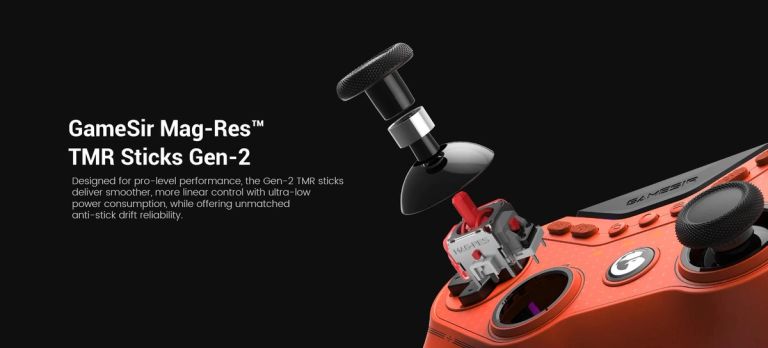
The Tarantula 8K uses GameSir's second-generation Mag-Res TMR modules. TMR stands for tunnelling magnetoresistance, a magnetic sensing technology that measures changes in magnetic fields rather than relying on the same physical electrical contact used by traditional potentiometer sticks.
That's significant because conventional potentiometer-based thumbsticks can gradually wear, producing inaccurate readings or unwanted movement commonly described as stick drift.
TMR technology removes that particular source of contact wear. However, it doesn't mean a controller is completely immune to drift or mechanical failures. Springs, centring mechanisms, calibration and other components can still develop problems over time.
GameSir also lists a 12-bit ADC and 4,096-level joystick resolution, providing finely graduated input measurements. That doesn't automatically prove superior aiming accuracy, but it gives the controller a technically capable foundation for precise analogue movement.
What should players notice in games?
In a first-person shooter such as Call of Duty, the important questions concern how smoothly the sticks respond to small corrections, how consistently they return to centre and whether diagonal movement feels predictable.
In a racing game such as Forza Horizon 5, gradual steering inputs and fine corrections matter more than simply having an exceptionally high polling rate.
The TMR hardware is promising for both situations. Independent reviewers have reported smooth movement and positive impressions of the sticks, although the technology's long-term durability will require extended use to assess properly.
It's also worth remembering that sensor resolution alone doesn't determine how a stick feels. Thumbstick tension, the physical range of movement, software curves and deadzone settings all affect the final experience.
For someone upgrading from an ageing gamepad with inconsistent sticks, those characteristics could make a larger difference than the change from 1,000Hz to 8,000Hz polling.
Dual-mode triggers: one controller for racing and shooters
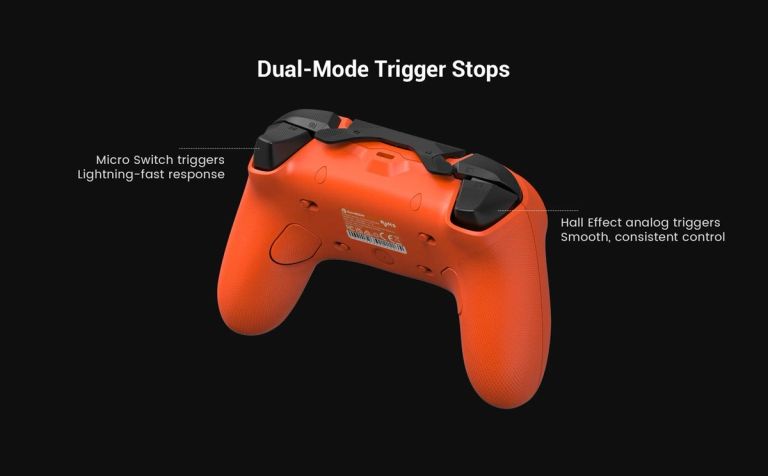
One of the Tarantula 8K's most practical features is the ability to switch between two distinct trigger behaviours.
In standard analogue mode, the triggers use Hall Effect sensors to provide proportional input. That makes them suitable for games where the amount of pressure matters.
In a racing game, for example, a gradual squeeze can control acceleration rather than simply switching between full throttle and no throttle.
Engaging the physical trigger stops changes the experience, providing a short, clicky microswitch action instead.
For a shooter, where a trigger is frequently used as a simple fire command, that shorter action may feel more immediate and satisfying.
| Game type | Suggested trigger mode | Why |
|---|---|---|
| Competitive FPS | Microswitch | Short, clicky actuation |
| Racing | Hall Effect analogue | Progressive throttle and braking |
| Action-adventure | Depends on game | Analogue control or faster button response |
| Platformers | Personal preference | Depends on trigger functions |
| Fighting games | Personal preference | Depends on control mapping |
The ability to change modes without replacing the controller makes the feature particularly appealing to players who switch between genres.
However, clicky triggers don't guarantee better shooting performance. Games differ in their input handling, and some competitive players may prefer the familiar feel of a conventional trigger.
The main benefit is flexibility.
Microswitch face buttons and a mechanical D-pad
The ABXY buttons also use mechanical microswitches rather than conventional membrane-style switches.
That gives each press a more distinct actuation point and a different tactile character.
For players accustomed to mechanical mouse buttons, that clicky feedback may be immediately appealing. It can be particularly useful in games involving frequent button presses, rapid directional changes or tightly timed inputs.
The mechanical D-pad is another interesting inclusion.
Fighting games such as Street Fighter 6 rely heavily on accurate directional inputs, whether executing quarter-circle motions, blocking or chaining combinations. A tactile D-pad can provide useful feedback, although its effectiveness ultimately depends on pivot geometry, directional separation and the preferences of the player.
There is a trade-off: mechanical controls can produce more audible clicking than softer membrane buttons, something worth considering when gaming in a shared or quiet room.
Nine remappable controls: useful customisation or too many buttons?
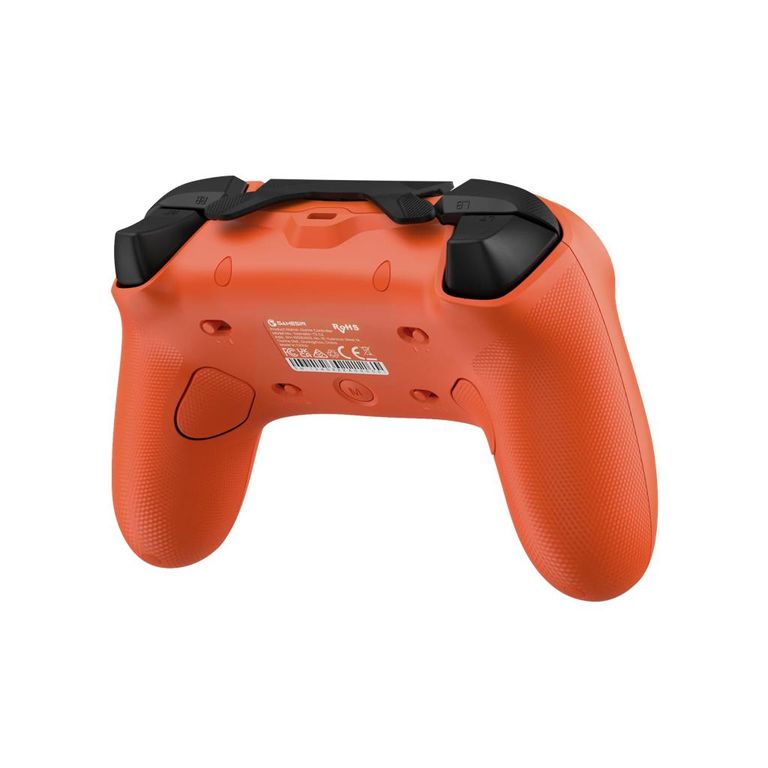
The Tarantula 8K includes nine additional remappable controls, which sounds like an enormous amount of freedom for a conventional gamepad.
According to GameSir, these are divided between two additional shoulder buttons (T1 and T2), two lockable rear buttons (L4 and R4), and five front-mounted controls (C1–C4 and T3). Each supports macro recording of up to 32 steps.
The appeal becomes clearer when considering games that would normally require a player to lift a thumb away from the right analogue stick.
In a shooter, assigning jump, crouch or reload to an easily reached extra control can allow players to maintain camera control while performing another action.
There are also practical applications outside competitive shooters, such as frequently used actions in RPGs or accessibility-oriented custom control layouts.
However, more buttons aren't automatically better.
Their positioning matters, and learning a new layout takes time. An additional control that's too easy to press accidentally may become a liability rather than an advantage.
The rear buttons can be physically locked, which is useful when they aren't needed. Independent testing also highlights a potential concern with the closely positioned additional bumper controls.
What about macros?
GameSir supports multi-step macro recording, but players should exercise caution when using automated input sequences in competitive multiplayer games.
Game publishers set their own rules governing macros, automation and unfair input assistance. A function being supported by controller software doesn't necessarily make it permitted in every online game.
For most players, straightforward button remapping is the safest and most useful starting point.
GameSir Connect: how much can players customise?
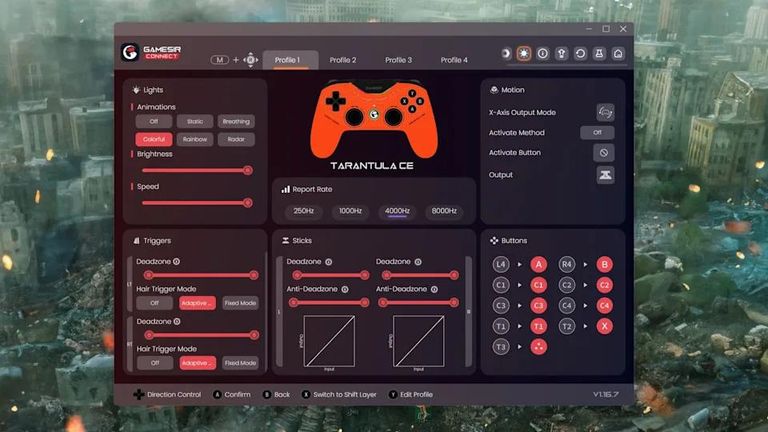
GameSir Connect is the companion Windows application used to configure the controller.
Rather than requiring players to accept a fixed set of controls, it supports adjustments to button mapping, macro functions, stick behaviour, trigger response and RGB lighting.
An important feature is the ability to switch between available polling-rate modes.
Windows Central's testing also found that the software was needed to configure the higher polling rates, with the controller initially operating at 250Hz, and that profiles could be saved for use without keeping the application open.
That makes software setup an important part of getting the most from the hardware.
For players buying the Tarantula specifically for its 8,000Hz capability, it's worth checking the polling-rate setting rather than assuming the maximum is enabled immediately.
The more advanced options also deserve a measured approach. Aggressive changes to stick sensitivity curves or deadzones can make a controller feel unusually responsive without necessarily making it more accurate.
A sensible starting point is to establish a comfortable default profile, change one setting at a time and assess whether each adjustment actually improves control.
Official resources: GameSir Tarantula 8K product information and GameSir's official FAQ.
What does the Tarantula 8K sacrifice?
For all its impressive specifications, the controller has limitations that prospective buyers shouldn't overlook.
Wired connectivity is the most obvious. If your PC is positioned close to a desk, a USB-C cable may be a minor inconvenience. If you prefer gaming from a sofa or moving freely around a room, a wireless controller is more practical.
The lack of vibration is arguably more divisive.
Rumble can provide feedback for collisions, weapon effects, environmental events and other gameplay moments. Removing that feedback may have little effect on a competitive FPS player who already keeps vibration switched off, but it changes the experience of many single-player and racing games.
There is also the symmetrical thumbstick arrangement. It's familiar to PlayStation users but may feel less natural to players who strongly prefer Xbox-style offset sticks.
And while the nine extra buttons create useful customisation opportunities, their placement won't necessarily suit every hand size or grip style.
None of those limitations makes the Tarantula 8K a poor controller. They simply reveal how specifically GameSir has targeted its design.
This is a controller optimised primarily for competitive PC inputs, not a universal replacement for every type of gamepad.
GameSir Tarantula 8K vs a conventional controller
| Category | Tarantula 8K PC | Typical mainstream wireless controller |
|---|---|---|
| Connection | Wired only | Often wireless and USB |
| Polling | Up to 8,000Hz | Varies by model and connection |
| Thumbsticks | Gen-2 TMR | Varies, often potentiometer or magnetic |
| Trigger options | Analogue and clicky | Usually analogue |
| Extra buttons | Nine remappable controls | Usually fewer |
| Rumble | None | Often included |
| Weight | Approx. 180g | Typically heavier |
| Best suited for | Competitive desktop PC gaming | General-purpose gaming |
This is a category-level comparison, not a benchmark against a particular competitor.
The comparison makes the product's positioning clear.
Its main strength isn't simply that it offers higher numbers. It's that it combines several precision-focused features in one relatively affordable package.
For players whose current controller already feels comfortable, works reliably and offers the control options they need, an upgrade may not be essential.
For players specifically seeking TMR sticks, microswitch buttons and greater remapping freedom, the Tarantula has a stronger argument.
GameSir Tarantula 8K PC: pros and cons
Pros
- Up to 8,000Hz polling over USB
- Second-generation TMR sticks
- Versatile dual-mode triggers
- Mechanical buttons and D-pad
- Extensive button customisation
- Lightweight 180g design
Cons
- No wireless connectivity
- No rumble or haptic feedback
- 8K polling gains may be imperceptible
- Extra bumper placement may not suit everyone
- PC-focused compatibility
- Software setup needed for higher polling modes
Who should buy the GameSir Tarantula 8K?
The Tarantula 8K makes the most sense for PC gamers who play at a desk, prefer symmetrical thumbsticks and want extensive control customisation without paying the prices associated with some flagship esports controllers.
Competitive shooter players may particularly appreciate the short-action triggers, extra button assignments and responsive mechanical controls.
Players concerned about conventional stick wear also have a reason to consider its TMR technology, although long-term reliability can never be guaranteed by sensor design alone.
It's less compelling for someone who primarily plays story-driven games, values rumble feedback, prefers wireless gaming from the sofa or needs one controller for several different platforms.
For those players, a more conventional wireless gamepad may provide a better overall experience, even with a lower polling-rate specification.
Final verdict: is 8,000Hz the real reason to buy it?
The GameSir Tarantula 8K PC demonstrates just how much advanced controller technology has become available without requiring a flagship price.
Its 8,000Hz polling rate is technically impressive, and independent testing indicates that the controller can approach its advertised maximum under suitable conditions.
However, raw polling frequency shouldn't dominate the buying decision.
The Gen-2 TMR sticks, dual-mode triggers, mechanical buttons and extensive remapping are likely to have greater practical importance for many players. These are features that affect how the controller behaves, how it can be configured and how comfortably it supports different playstyles.
Its shortcomings are equally straightforward. No wireless functionality and no rumble make it less versatile than some alternatives, while the sheer number of extra controls may not appeal to everyone.
For competitive-minded PC gamers willing to accept those compromises, the Tarantula 8K looks like a particularly strong option at its launch price.
The bottom line: don't buy the GameSir Tarantula 8K solely because it says 8,000Hz on the box. Consider it for the combination of precise magnetic sticks, flexible triggers, mechanical controls and unusually extensive customisation. That's where its strongest value proposition lies.
Frequently asked questions
Is the GameSir Tarantula 8K wireless?
No. The Tarantula 8K PC is designed for wired USB-C operation and has no internal battery.
Does 8,000Hz polling improve your aim?
Not automatically. Higher polling can reduce the interval between input reports, but aiming performance also depends on stick feel, game processing, display latency, player skill and other factors.
Does the GameSir Tarantula 8K have stick drift?
Its magnetic TMR sticks avoid a common contact-wear mechanism associated with traditional potentiometer sticks. However, no thumbstick technology can be guaranteed entirely drift-free over its lifespan.
Can you use the Tarantula 8K on PS5 or Xbox?
The Tarantula 8K PC is marketed for wired PC use. Buyers shouldn't assume native PlayStation or Xbox console compatibility.
Does it have vibration?
No. GameSir deliberately removed the vibration motors and battery to help achieve its lightweight design.
Can you change the polling rate?
Yes. Supported options include 250Hz, 1,000Hz, 4,000Hz and 8,000Hz, configurable through GameSir Connect.

Written by
Jessica ThompsonAs a dedicated gaming journalist with over five years of experience, I've immersed myself in the ever-evolving world of video games. Currently, I contribute to Gamerbolt.com and PS6news.com, where I cover the latest in gaming news, in-depth game reviews, and industry trends. At Gamerbolt.com, I've had the privilege of shaping content strategies, writing comprehensive articles, and engaging with a passionate community of gamers. My role involves not only crafting engaging narratives but also staying ahead of the curve with the latest gaming innovations and upcoming titles.