


Close Menu
GamerBolt – Level Up with Playable Games & Trusted Gaming ContentGamerBolt – Level Up with Playable Games & Trusted Gaming Content
    Facebook X (Twitter) Instagram
    GamerBolt – Level Up with Playable Games & Trusted Gaming ContentGamerBolt – Level Up with Playable Games & Trusted Gaming Content
    Facebook X (Twitter)
    • Game News
    • Play
    • Gamertag Generator
    • Discover
      • Best Games
      • Past & Retro
      • Roblox Username Generator
      • VR
      • Next-Gen
      • PC
      • Tech
      • PlayStation
      • Xbox
      • Nintendo
      • Mac
      • Cross Platform
      • Live Streaming
      • eSports
    GamerBolt – Level Up with Playable Games & Trusted Gaming ContentGamerBolt – Level Up with Playable Games & Trusted Gaming Content
    Accessories

    The Best Wii U LAN Ethernet Adapters

    Jessica ThompsonBy Jessica ThompsonJanuary 5, 2017Updated:March 2, 2017No Comments3 Mins Read
    Share
    Facebook Twitter Pinterest Reddit WhatsApp Email

    It seems fair to say that exciting times are just around the corner for Nintendo fans, this is because the Switch will be arriving early next year. This could only mean one thing for the Wii U, and Nintendo recently confirmed that the console would be discontinued as the focus has now moved towards their new endeavour. Unlike the Nintendo Wii and Wii U, maybe the Switch will have a built-in Lan adapter. Let’s continue.

    Table of Contents
    1. Wii and Wii U: No LAN Port
    2. The Simple Solution: Wii U LAN Adapter
    3. The Best Wii U Adapters
    4. What does LAN mean?
    5. How To Use Your Wii U LAN Adapter 
    6. Conclusion

    Wii and Wii U: No LAN Port

    It is a surprising fact, but one missing element from the Wii U is the LAN and Ethernet port, just as with the standard Wii. Whilst the console was launched back in 2012, many people appear to still be searching for information on this subject – thus, we have put this guide together. With that said, let’s begin.

    The Simple Solution: Wii U LAN Adapter

    Technology has continued to evolve to the point as to where many have the ability to access a wireless router via Wi-Fi (IEEE 802.11b/g/n). However, the word ‘many’ also implies that a minority doesn’t. Furthermore, you cannot beat a direct connection for speed when gaming online and it remains popular today.

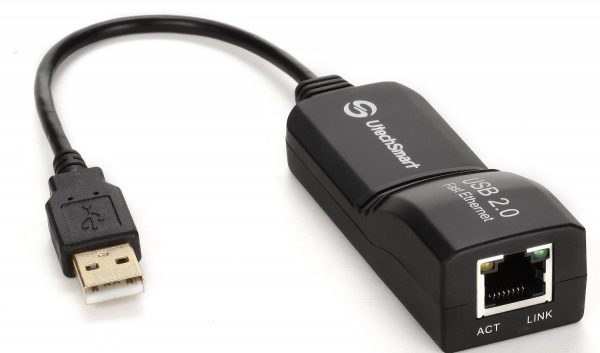
    Nintendo has now discontinued their official LAN adapters, but the good news is that there are many third-party options available, all of which do the same job. The real problem is that some are terrible, cheap and just won’t give you improved performance. Therefore, we have listed below some of the more premium adapters available, which come highly recommended.

    The Best Wii U Adapters

    [asa2_smart_collection tpl=”Sortable_table” cat_slug=”wii-u-lan-adaptor” col_title”no” limit=”5″ col_rating=”no” is_available_main=”no” col_release_date=”no” /]

    What does LAN mean?

    What does LAN even mean? Local Area Network. Connecting via the USB port, a LAN adapter allows you to create a direct connection between your modem using an Ethernet cable. It’s very simple to do and is useful for those who don’t have a wireless router or modem, or for players wanting to garner greater reliability and speeds when playing online. Owning this handy adapter isn’t just useful for Wii U owners, but for Wii owners, too.

    How To Use Your Wii U LAN Adapter 

    You might worry that this is going to be some complex task. You’ll be pleased to read however, that it is very easy – and we will now walk you through the process. First, ensure your console is turned off. Secondly, locate one of the USB ports on your Wii U console and then plug the adapter in. Thirdly, you’ll need to plug an Ethernet cable into the correct socket on your modem or router. From here, switch your Wii U console on and then enter the System Settings menu, followed by Internet Settings, then select the Connect To The Internet option. Once you reach the Internet Connection Setup menu, select Connection Type, and then select Wired Connection. 

    Note: If you encounter any problems, then enter the error code here to resolve the issue. Also, ensure that your console has the latest software update installed.

    Conclusion

    Whilst the need for a Wii U LAN or Ethernet adapter might be declining and fading, this guide has provided the best options for those wishing to plug directly into their Wii U console from their modem or router, whilst also providing some information and tips. Your online gameplay should now be smoother and faster. Perhaps you have a recommendation? Feel free to leave your thoughts within the comment section below.

    Share. Facebook Twitter Pinterest LinkedIn WhatsApp Reddit Email
    Previous ArticleA Look Back at 2016
    Next Article Being a Female Gamer (Gamer Girl) in a Male Dominant Community
    Jessica Thompson

    As a dedicated gaming journalist with over five years of experience, I've immersed myself in the ever-evolving world of video games. Currently, I contribute to Gamerbolt.com and PS6news.com, where I cover the latest in gaming news, in-depth game reviews, and industry trends.  At Gamerbolt.com, I've had the privilege of shaping content strategies, writing comprehensive articles, and engaging with a passionate community of gamers. My role involves not only crafting engaging narratives but also staying ahead of the curve with the latest gaming innovations and upcoming titles.

    Subscribe
    Connect with
    I allow to create an account
    When you login first time using a Social Login button, we collect your account public profile information shared by Social Login provider, based on your privacy settings. We also get your email address to automatically create an account for you in our website. Once your account is created, you'll be logged-in to this account.
    DisagreeAgree
    Notify of
    Connect with
    I allow to create an account
    When you login first time using a Social Login button, we collect your account public profile information shared by Social Login provider, based on your privacy settings. We also get your email address to automatically create an account for you in our website. Once your account is created, you'll be logged-in to this account.
    DisagreeAgree
    Please login to comment
    0 Comments
    Inline Feedbacks
    View all comments
    Accessories
    5 Mins Read
    Nacon RIG R5 Pro HS Review – PlayStation Performer
    By Jessica ThompsonNovember 28, 20255 Mins Read

    Nacon is perhaps one of the most interesting companies in the gaming industry right now.…

    Featured
    6 Mins Read
    The Week in Gaming News: June 10th – June 16th
    By Jay AllsoppJune 17, 20246 Mins Read

    The season for exciting summer gaming shows came to a close this week, with the…

    Best Games
    6 Mins ReadUpdated:May 30, 2024
    The Best Games for June 2024
    By Jay AllsoppMay 30, 20246 Mins Read

    Summer is upon us (according to some definitions, at least), and so the temptation to…

    Best Games
    7 Mins ReadUpdated:April 27, 2024
    The Top 10 Fighting Games on Xbox Game Pass [2024]
    By Natalia W.April 27, 20247 Mins Read

    Fighting games are some of the most popular types of games, and this is definitely…

    GamerBolt – Level Up with Playable Games & Trusted Gaming Content
    Facebook X (Twitter)
    • Home
    • About
    • Advertising
    • Our Authors
    © 2026 GamerBolt.com by iNet Ventures LTD.

    Type above and press Enter to search. Press Esc to cancel.

    wpDiscuz