By
In this guide
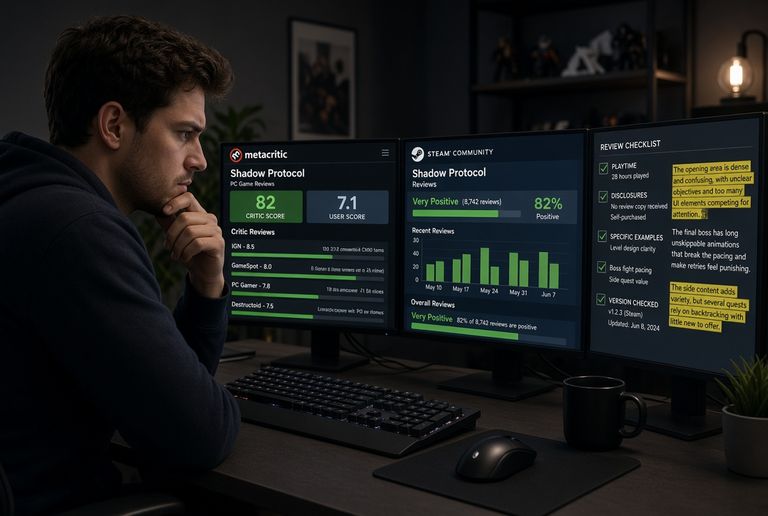
In 2019, Valve changed how Steam calculates its review scores. Reviews posted during a confirmed off-topic review bomb stopped counting toward a game's percentage by default, although players could opt to include them.
That change showed why a single score needs context. A number on its own tells you very little about whether a game suits you.
Game reviews can still be valuable buying tools. You simply need to know where to look inside them.
This guide covers 10 checks that turn any review from a verdict into useful information.
Start With the Platform and Hardware
1. Find the platform the reviewer played on
A game's performance can vary between PS5, Xbox Series S, Switch 2 and PC. Look for the reviewed platform near the top or bottom of the review.
Pay attention to the exact model, too. A verdict based on one console version should not automatically stand in for every other version, particularly when the review discusses image quality or performance.
If the review covers a version you do not own, treat its comments on frame rate and loading with caution.
2. Check the hardware details
PC reviews should list the CPU, GPU and RAM used. A verdict from a machine with an RTX 4090 cannot tell you exactly how a mid-range laptop will perform.
Console reviews matter here too. Check whether the writer used a standard PS5 or PS5 Pro before applying the performance findings to your own setup.
Storage is worth a glance as well. With GTA 6 requiring up to 212GB depending on the device, a review that mentions install size and loading times gives you useful practical information before you download.
Check How Long the Reviewer Played
3. Look for the hours played
Twelve hours in a 60-hour RPG may support an early assessment, but not a verdict on its ending or full progression. A review that states its playtime lets you judge how much of the game it covers.
Look for whether the main story was finished, too. That detail is particularly useful when the review makes claims about pacing, the ending or the overall campaign.
4. See whether side content and multiplayer were tested
Pre-release multiplayer testing may involve scheduled sessions with reviewers rather than a full public population. A good review will explain those conditions and say whether online play was tested after launch.
The same principle applies to post-game content, crafting systems and optional areas. If they are missing from the text, do not assume the verdict covers them.
Find Out Which Version Was Reviewed
5. Note the launch date or patch number
Modern games can change quickly. A review written on launch day may describe bugs that were fixed a week later.
Online titles make the value of a version number especially clear. Released on September 15, 2026, the Dota 2 patch numbered 7.41f adjusted hero abilities and item costs, changing the conditions behind earlier assessments.
6. Look for updated or revisited reviews
Look for follow-ups after large patches or expansions. A detailed reassessment may be more relevant to the version you can buy than the original launch verdict.
However, do not assume the headline score was changed. Read the update note itself and check which parts of the game were tested again.
Look for Outlets That Explain Their Testing
7. Follow outlets that show their method
The most useful game reviews explain how the verdict was reached. Platform, playtime and build details help you weigh the score against your own setup.
Scores can also shape expectations. A 2010 review scores study by EEDAR and SMU's Guildhall found that exposure to different scores affected participants' opinions and purchasing interest.
Independent game reviews can add another perspective on combat, exploration and performance; read more here and compare those impressions with what you want from a game.
Look for concrete examples behind the verdict, whether you prefer written reviews, videos or player feedback. A description of a difficult fight or a demanding area tells you more than praise alone.
Then compare coverage over time. Reading an early preview alongside a launch review can help you see which ideas developed and which questions the finished game answered.
Read Performance Claims Carefully
8. Check how performance was measured
Words like "smooth" or "stable" are more useful when backed by numbers. Look for frame rates, resolution and the graphics mode used, and distinguish a target from a measured result.
If the game offers Performance and Quality modes, a review should state which one it judged. Different modes need their own observations rather than a single blanket verdict.
Check where the reviewer tested, too. A quiet opening area cannot tell you everything about a crowded city or a demanding late-game battle.
PC reviews should also mention whether upscaling such as DLSS or FSR was switched on. Compare results at similar settings before using them to estimate your own experience.
Understand What Steam's Score Is Counting
The Steam percentage looks simple, but Valve has adjusted its calculation. Since 2019, reviews posted during an identified off-topic review bomb can be excluded from the score by default while remaining visible.
On August 18, 2025, Valve introduced language-specific scores for eligible games. Its announcement set thresholds of more than 2,000 publicly visible reviews overall and at least 200 written reviews in a language before a score for that language could appear.
The displayed score follows the user's primary language when a qualifying score is available, not simply their country. Users can inspect the language breakdown or choose the all-language score in their store preferences.
Two players can therefore see different percentages for the same game because they are looking at different groups of reviews.
Match the Reviewer's Taste to Yours
9. Learn what the reviewer likes
A reviewer who loves strategy games may value a slow 4X title differently from someone who prefers fast shooters. Read the reasoning rather than assuming either score should match your own.
Reading three or four past reviews by the same writer can help reveal their preferences. Once you understand those priorities, their scores become easier to interpret.
10. Compare several sources and check the dates
Avoid letting one review decide a purchase. Compare written criticism, video coverage and player feedback, paying attention to where their observations agree.
On Steam, compare recent and all-time reviews where both are available. Recent reviews cover the last 30 days. Check the language filter as well so you know which group each figure represents.
A big gap is a reason to investigate, not an explanation by itself. Read recent comments and update notes to see whether patches, technical problems or changing player expectations account for the difference.

Written by
Jessica ThompsonAs a dedicated gaming journalist with over five years of experience, I've immersed myself in the ever-evolving world of video games. Currently, I contribute to Gamerbolt.com and PS6news.com, where I cover the latest in gaming news, in-depth game reviews, and industry trends. At Gamerbolt.com, I've had the privilege of shaping content strategies, writing comprehensive articles, and engaging with a passionate community of gamers. My role involves not only crafting engaging narratives but also staying ahead of the curve with the latest gaming innovations and upcoming titles.