


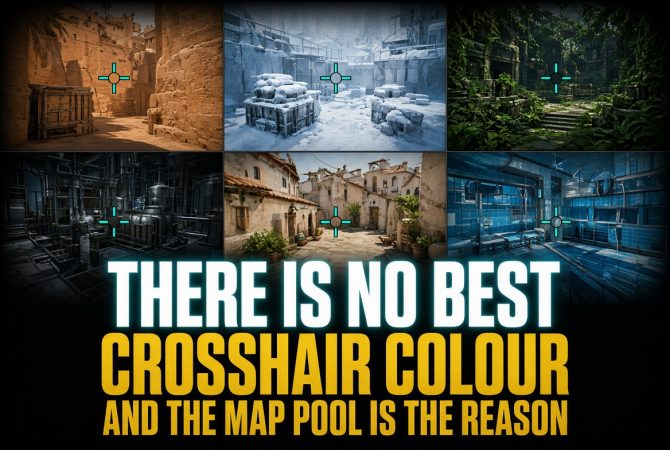

Crosshair colour is probably the most inconvenient crosshair setting in CS2. It’s also the only one that doesn’t change the aiming itself, yet no colour works equally well in every situation. A setup can feel completely comfortable for several matches and then become invisible at the wrong moment. Changing the colour often only moves the same problem somewhere else. The crosshair is better treated as a visual reference rather than a setting that needs a perfect universal answer. The practical goal is to find a colour that works reliably across most of the map pool and keep it unchanged.
What Colour Actually Does
Crosshair colour in CS2 is useful only when it remains visible against the background behind it. A colour doesn’t become better simply because it’s green, cyan, yellow, or red. What matters is the contrast it creates against nearby textures under the current lighting. The same colour can be easy to track against one surface and much less visible against another, while brightness can strengthen or reduce that contrast. As a result, crosshair colour should be judged together with the map backgrounds, positions, and brightness settings used in actual matches.
The Map Pool Contradicts Itself
The most practical reference point is CS2 PRO Crosshairs, where green and cyan presets appear regularly, while purple colours are also common. Saturated green and cyan therefore work more as universal compromises than ideal choices, as they remain visible across more situations than most other colours. However, no colour remains equally visible across every map, so the colour palette, lighting, and backgrounds of each map still need to be considered.
| Map | Backgrounds That Matter | Contrast Result |
| Ancient | The crosshair spends much of the round over grey stone and concrete, while most green areas sit lower on the ground or higher in the scenery. | Blue-violet gives stronger separation from the main aiming backgrounds than green. |
| Anubis | Bright sand and pale stone dominate many positions, with blue water and sky appearing in other areas. | Blue, cyan, and magenta contrast well with the warm surfaces, although blue and cyan can become less visible near water. |
| Cache | Pale concrete and white walls are mixed with desaturated green, blue, and orange surfaces. | Cyan provides strong contrast across much of the map, while green can become less visible around green surfaces and vegetation. |
| Dust2 | Sand, pale beige walls, and bright outdoor areas dominate most positions. | Saturated blue-cyan provides strong contrast against the warm surfaces. |
| Inferno | Brick, orange-brown walls, darker interiors, and vegetation appear across different areas. | Blue-cyan provides strong contrast against the dominant warm palette. |
| Mirage | Warm beige stone, pale walls, sand, and muted brown surfaces dominate much of the map. | Blue-cyan provides stronger contrast than yellow and other warm shades. |
| Nuke | Grey concrete, steel, white surfaces, and cold industrial tones dominate the map. | Magenta provides stronger separation than the blue-cyan shades suited to warmer maps. |
| Vertigo | Bright concrete, steel, and open sky dominate many exposed areas. | Cyan and light blue can become less visible against the sky, while green, yellow, or pink provide stronger contrast in those areas. |
Where the Numbers Come From
No published studies have established how crosshair colour performs specifically in CS2. Professional colour preferences can be measured by counting the settings used within a defined player sample, but that only shows what those players choose. Visibility requires a different type of testing because the same colour can behave differently against stone, concrete, vegetation, sky, smoke, and indoor lighting. Brightness settings can change the result as well. This is why percentages about professional choices and conclusions about map visibility should be kept separate. One describes player preferences, while the other describes how a colour contrasts with specific backgrounds. For crosshair colour, the most useful numbers are those tied to a clear player sample or a defined visual test rather than treated as universal values.
The Outline Does More Than the Colour
Colour alone can’t keep a crosshair equally visible when the background changes between bright surfaces, dark areas, and smoke. An outline adds a dark border around the crosshair through cl_crosshair_drawoutline, which can make the main lines easier to distinguish when their colour is close to the background. However, the outline isn’t a universal solution because a thick border can cover part of the crosshair itself. Transparency is controlled through cl_crosshairalpha. A value of 255 makes the crosshair fully opaque, while lower values make the entire crosshair more transparent. Excessive transparency can make the crosshair harder to notice.
The Limits of Default Green
Why Green Is a Problematic Default
CS2 uses green as the default crosshair colour, but that choice isn’t equally suitable for every player. A 2025 review by optometry researcher Ali Almustanyir from King Saud University reported that red-green deficiencies account for about 95% of congenital colour vision deficiency cases. As a result, certain greens, reds, browns, and nearby shades can be harder to distinguish for people with these colour vision differences. Green also behaves differently across the map pool. On Ancient, much of the aiming area consists of grey stone, but green textures still appear across many parts of the map. The problem isn’t that green always becomes invisible. Its visibility depends on colour perception and the background behind the crosshair.
Custom Colours Give More Control
A custom colour through cl_crosshaircolor 5 gives more control than the preset options. Instead of choosing only green, yellow, blue, cyan, or red, the colour can be adjusted to separate it more clearly from backgrounds that cause visibility problems. Blue or cyan may work better for some red-green colour vision deficiencies, while other colour vision differences may require another option. Several saturated colours can be tested against bright surfaces, dark interiors, smoke, and the maps actually played. The final choice should be the colour that remains visible across the widest range of those situations.
How to Actually Pick Yours
Crosshair colour should be tested in the same conditions where it will be used during matches. A practical setup can be checked with a few simple steps:
- Test the colour on the maps that are played regularly instead of using one map as the reference.
- Compare it against the brightest surface, the darkest area, and smoke on each map.
- Use the Crosshair preview in Settings for initial adjustments, or Workshop maps with crosshair testing tools, then check the colour on actual map backgrounds.
- Test the final option in Deathmatch before using it in Premier, Competitive, or FACEIT matches.
- Keep the chosen colour unchanged once it remains visible across the required situations.
Once a suitable colour is found, there’s little practical reason to keep replacing it after individual matches.
When Colour Stops Being the Answer
There will always be a position where another crosshair colour provides better contrast. Trying to adjust the setting for every exception only creates another reason to change it again later. A practical crosshair doesn’t need to provide maximum contrast in every part of every map. It needs to remain visible often enough that the setting can stay unchanged during regular matches. Once a colour meets that requirement, further adjustments provide little practical value, and there’s no reason to return to the setting after every situation where another colour might have worked better.
