By
In this guide
- Google Stadia: What Happened, Shutdown Date and What You Can Still Use
- When did Google Stadia shut down?
- What happened to Stadia games and purchases?
- Can you still get a Google Stadia refund?
- Can you use a Google Stadia Controller in 2026?
- Why did Google Stadia close?
- What replaced Google Stadia?
- Frequently Asked Questions
- Sources and further reading
Google Stadia: What Happened, Shutdown Date and What You Can Still Use
Google Stadia is no longer a playable cloud-gaming service. Google shut its servers down on January 18, 2023, so Stadia accounts, the game store and the Stadia library can no longer be used to launch games. The hardware did not all become useless, however: an already-converted Stadia Controller can still work as a Bluetooth gamepad, and the controller can also connect by USB.
This guide explains when Stadia closed, what happened to purchases and saved games, what you can do with a Stadia Controller today, and which current cloud-gaming services may fit former Stadia players. Last reviewed: November 20, 2026.
| Stadia question | Current answer |
|---|---|
| When did Stadia shut down? | January 18, 2023 |
| Can you play games on Stadia now? | No. Stadia servers and game access are offline. |
| Are Stadia purchases refundable now? | Google’s shutdown refund programme has ended; Stadia Pro fees were excluded. |
| Can you still use the Stadia Controller? | Yes by USB; Bluetooth works if the controller was converted. |
| What is the closest replacement? | There is no exact replacement; GeForce NOW and Xbox Cloud Gaming use different game-access models. |
A quick status check for Google Stadia, reviewed November 20, 2026.
When did Google Stadia shut down?
Google announced the shutdown on September 29, 2022, and turned off Stadia on January 18, 2023. The Stadia Store stopped taking purchases in September 2022. After the shutdown, the Stadia website and app no longer provided access to the cloud service or its games.
Google’s announcement said Stadia had not gained the user traction the company expected. It also described plans to refund qualifying Google Store hardware and Stadia Store game and add-on purchases. Read Google’s shutdown announcement for the company’s original statement.
What happened to Stadia games and purchases?
Stadia was a cloud service, not a console that could keep running games locally. Its titles ran on Google’s servers and streamed video to a player’s screen. When those servers closed, the Stadia versions of games stopped being playable through Stadia. Buying a game on Stadia did not automatically grant a copy on Steam, Xbox, PlayStation or another service.
Some publishers offered account linking, cross-progression or save transfers for particular games. Those options depended on each publisher and often had their own deadlines. A Stadia purchase should therefore be treated as a Stadia licence, not a transferable PC or console licence.
Can you still access Stadia game saves?
Google’s shutdown guidance directed players to publishers for game-by-game progress transfers. Some players exported Stadia account data with Google Takeout before shutdown, but an export is not the same as a playable save: formats and import support varied by game. If you already downloaded an archive, keep a local backup and check the relevant publisher’s current documentation. Do not assume an old Stadia save can now be imported into another version.
Google’s Stadia shutdown FAQ covers game access, refunds and the publisher-dependent options that existed for progress transfers.
Can you still get a Google Stadia refund?
Google’s shutdown programme covered qualifying Stadia hardware bought through the Google Store and games, add-ons and eligible in-game purchases bought through the Stadia Store. Stadia Pro subscription fees were not eligible. Google said it would attempt automatic refunds, generally to the original payment method, and contact customers if another refund method was needed.
That was a shutdown-era programme, not an ongoing refund offer. Its processing period has passed. If you believe an eligible refund was never completed, check the Google Account and payment method used for the purchase, look for old refund emails, and contact Google Payments support with the transaction details. Whether a late claim can be resolved is up to Google; there is no current Stadia storefront through which to submit a new request.
Can you use a Google Stadia Controller in 2026?
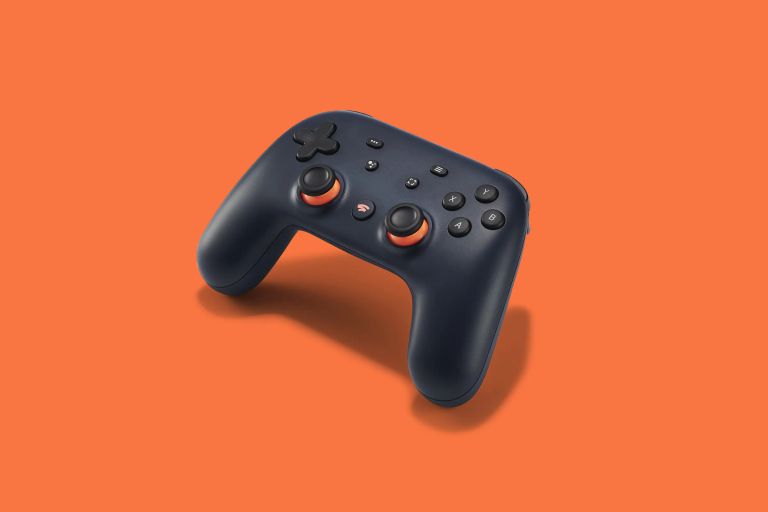
Yes. The Stadia Controller can be used with a USB cable. For wireless play, its firmware had to be changed from Stadia’s proprietary Wi-Fi mode to Bluetooth Low Energy. That conversion is permanent: it disables the controller’s original Stadia Wi-Fi mode, and Bluetooth compatibility varies by device and game.
Google’s browser-based conversion tool was available until December 31, 2025, then went offline in January 2026. Google’s support pages still contain older instructions and deadlines, so do not assume the official web tool is currently available. Some community members archived the conversion tool, but those copies are unofficial and are not supported by Google. Only use third-party firmware tools if you understand and trust the source.
If your controller was already converted, put it into pairing mode using the controller’s button combination and pair it from your device’s Bluetooth settings. If it was not converted, a USB connection remains the straightforward supported option. The Assistant and Capture buttons do not retain their Stadia functions after the service closed.
Google documents the controller’s USB and Bluetooth behavior in its Stadia Controller support guide. The guide’s conversion deadline is historical; the official conversion website has since been removed.
The official controller page listed December 31, 2025 as the final conversion date. 9to5Google reported in January 2026 that Google had taken the web tool offline; community mirrors are separate from Google support.
Why did Google Stadia close?
Google’s stated reason was that Stadia had not gained the level of user traction the company expected. Google also said it would continue using Stadia’s streaming technology in other areas and with industry partners. That is the official explanation; there was no single detailed public postmortem assigning the shutdown to one cause.
In hindsight, Stadia asked players to trust a new storefront and cloud platform while its catalogue, pricing model and long-term future were still being established. Those are reasonable factors to consider when discussing its reception, but they are analysis rather than a definitive list of reasons published by Google.
What replaced Google Stadia?
No service is a one-to-one replacement. Stadia combined a cloud platform with games bought specifically for Stadia. Today’s options differ in which games you can play, how you access them, supported devices, regions, performance limits and subscription requirements. Check a service’s live game list before paying.
| Service | Game access model | Worth checking if… |
|---|---|---|
| NVIDIA GeForce NOW | Streams supported games from connected PC stores; ownership or an eligible subscription is usually required. | You already own PC games and those titles are supported. |
| Xbox Cloud Gaming | Cloud play is tied to Microsoft’s current Game Pass plans and supported games. | You want a rotating subscription catalogue or supported Xbox titles. |
| Amazon Luna | Offers a changing selection through Amazon’s current regional plans and channels. | You use supported devices and the service is available in your country. |
| PlayStation Plus Premium | Includes cloud streaming for eligible PlayStation titles in supported regions. | You are already invested in PlayStation’s catalogue. |
These services have different catalogues and terms; availability, features and prices change.
Before choosing, compare the specific game you want, whether you need to buy it, device and regional support, session or monthly limits, and your internet connection. A service that streams games you already own can feel very different from Stadia’s former storefront.
Frequently Asked Questions
Is Google Stadia still available?
No. Google shut the Stadia streaming service down on January 18, 2023. You cannot sign in to play games through Stadia or buy titles in its store.
What date did Stadia close?
Stadia’s servers were turned off on January 18, 2023. Google announced the wind-down on September 29, 2022.
Can I play Stadia games on another platform?
Not because you bought them on Stadia. A publisher may support a separate cross-progression or transfer process for a particular game, but you generally need access to that game on the other platform too.
Can I still convert an unmodified Stadia Controller to Bluetooth?
Google’s official conversion tool was taken offline in January 2026 after its published December 31, 2025 deadline. Unofficial community archives have been reported, but Google does not support them. A Stadia Controller can still be used over USB.
Did Google refund Stadia Pro subscriptions?
No. Stadia Pro subscription fees were excluded from Google’s shutdown refund programme. Qualifying hardware and Stadia Store purchases were covered under the programme’s terms.
What is the closest alternative to Stadia?
It depends on how you used Stadia. GeForce NOW may suit players with supported PC-store games; Xbox Cloud Gaming may suit players who prefer a subscription catalogue. Neither service reproduces Stadia’s exact store, library or account model.
Sources and further reading
Google: Stadia shutdown announcement (September 29, 2022)
Google: Stadia Announcement FAQ (shutdown date, refund terms and game progress)
Google: Changes to Stadia availability (service and controller status)
Google: Connect your Stadia Controller to a device (USB/Bluetooth guidance; older conversion deadline text)
Google: Stadia launched on November 19, 2019
9to5Google: Stadia Controller conversion tool taken offline (January 20, 2026)

Written by
Jay AllsoppMeet Jay, the visionary Founder of GamerBolt, who launched this gaming haven in 2010. A dedicated PS5 enthusiast, Jay thrives on the adrenaline rush of Call of Duty and the competitive spirit of EA Sports FC. His passion for gaming goes beyond play; it's about creating a community for fellow gamers to celebrate the worlds and stories they love; Gamerbolt.