




Playing games has always been social. From swapping cartridges and crowding around split-screen games to clans, guilds, Discord servers and massive online communities, connecting with other players is a huge part of gaming culture.
Building a gaming community of your own, however, is a little different from simply joining one.
You need to give people a reason to arrive, a reason to participate and, most importantly, a reason to return.
The good news is that you don’t need thousands of followers, an enormous budget or a popular YouTube channel to get started. Some of the best gaming communities begin with a handful of players who simply enjoy the same game, genre or style of gaming.
Whether you’re creating a Discord server, gaming clan, esports community, Minecraft group or something considerably bigger, here’s how to build a gaming community from scratch.
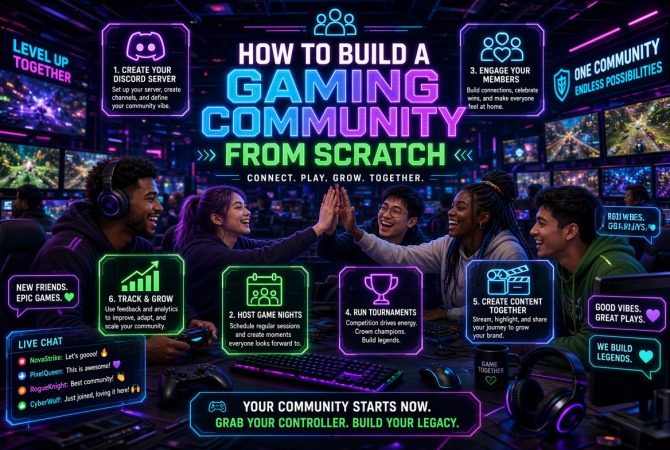
1. Decide What Your Community Is Actually About
Before creating social accounts or spending hours configuring Discord, answer one question:
Why would somebody join your community instead of one of the thousands that already exist?
“People who like video games” isn’t specific enough.
A community could instead revolve around:
- A particular game
- A franchise such as Pokémon or Call of Duty
- Minecraft building or modding
- Competitive gaming
- Retro gaming
- Speedrunning
- PC gaming
- Indie games
- Gaming deals
- Game development
- A particular console
- Achievement or trophy hunting
- Finding people to play with
- A gaming creator or streamer
- A specific clan or esports team
If competitive gaming is going to be the focus, our guide on how to begin competitive esports gaming is also worth reading, particularly if you want the community to eventually develop teams or take part in organised competition.
You don’t necessarily have to stay within your original niche forever. Starting with a recognisable identity simply makes attracting your first members much easier.
Imagine two Discord servers.
One says:
“A server for gamers. Talk about games and meet people.”
The other says:
“A relaxed community for adult PC gamers looking for people to play co-op games with in the evenings.”
The second immediately tells potential members whether the community is for them.
That matters enormously when you’re starting from zero.
2. Give the Community a Memorable Name
Your community needs an identity.
If you’re creating a clan or team, our guide to creating the perfect clan name goes into much more detail on choosing something memorable, checking availability and finding a name that fits your group’s personality.
More generally, try to find a community name that’s distinctive enough for people to remember while still making sense for the audience you’re targeting.
Avoid making the name unnecessarily complicated. If somebody hears it during a Twitch stream or voice chat, ideally they should be able to remember and search for it afterwards.
Before committing, check:
- Discord
- YouTube
- Twitch
- TikTok
- X
- Domain availability
This last point is easily forgotten.
Even if you’re starting entirely on Discord, securing your community’s domain name early can be worthwhile. If the community eventually grows, you might want a website containing guides, news, server information, tournaments, merchandise or other resources.
Domains are inexpensive compared with having to buy one from somebody who registered your name first. If you’re keeping the initial costs down, it’s also worth checking available offers such as Namecheap discounts from HostAdvice before purchasing or renewing domains and hosting.
You don’t necessarily need to build the website immediately. Securing the name gives you the option later.
3. Create a Recognisable Visual Identity
You don’t need to hire an expensive branding agency for a small gaming community.
You do need consistency.
At minimum, create:
- A logo or profile image
- A small colour palette
- A Discord server icon
- Social-media graphics
- A simple banner
- A consistent community description
Use the same basic identity everywhere.
If somebody discovers your TikTok account and later encounters your Discord server, they should immediately recognise that they’re connected.
Don’t obsess over perfection at this stage. Your branding can evolve as the community develops.
4. Make Discord Your Community Hub
For many gaming communities, Discord is the obvious place to establish the main hub.
Discord’s Community Server features are designed specifically for building larger communities, with tools including onboarding, announcement channels, AutoMod and Server Insights.
The temptation when creating your first server is to add dozens of channels.
Don’t.
An empty server with 40 channels can make a community look considerably less active than a server with five channels containing actual conversations.
Start small.
A basic structure might look something like:
INFORMATION
- #welcome
- #rules
- #announcements
COMMUNITY
- #general
- #gaming
- #screenshots
- #looking-for-group
VOICE
- General
- Gaming
- AFK
Then expand based on how members actually use the server.
If everyone starts discussing Minecraft in #gaming, perhaps Minecraft deserves its own channel.
If nobody ever uses #screenshots, you don’t need another five media channels.
Let member behaviour shape the server rather than trying to predict everything beforehand.
5. Make Joining Incredibly Easy
Joining a Discord server only to encounter 70 channels, ten bots and an elaborate verification system isn’t particularly welcoming.
Your onboarding should quickly answer three questions:
Where am I?
What should I do?
Where should I talk?
Discord’s Community Onboarding allows new members to select roles and channels through introductory questions. For a gaming community, those questions could include:
What games are you interested in?
- Minecraft
- Fortnite
- Call of Duty
- GTA
- Other games
What are you here for?
- Finding teammates
- General gaming discussion
- Competitive play
- Events
- Game recommendations
Members can then receive appropriate roles and channels.
Keep the process short.
Every additional step is another opportunity for somebody to decide joining isn’t worth the effort.
Your goal isn’t to collect information.
It’s to get somebody participating.
6. Establish Rules Before You Need Them
Rules may seem unnecessary when your community consists of you and twelve friendly people.
That changes surprisingly quickly.
Create basic guidelines covering things such as:
- Harassment
- Hate speech
- Spam
- Self-promotion
- NSFW material
- Spoilers
- Scams
- Cheating
- Piracy
- Personal information
- Arguments
- Moderator decisions
Don’t create an enormous legal document.
Rules should be understandable.
Make them easy to find and make it clear what happens when somebody ignores them.
You can always expand them when unusual situations occur.
7. Seed the Community With Content
There’s a strange problem every new community faces.
Nobody wants to participate because nobody else is participating.
Someone joins.
They look around.
Nothing has happened since Tuesday.
They leave.
You therefore need to manufacture the initial momentum yourself.
Post regularly.
Try:
- Gaming news
- Memes
- Screenshots
- Polls
- Questions
- Game recommendations
- Clips
- New releases
- Deals
- Updates
- Challenges
Instead of simply posting a link to some news, start a conversation around it.
For example:
“Rockstar just announced X.”
is less inviting than:
“Would this actually make you return to the game?”
The second gives people something to answer.
You can also use current releases and industry stories as conversation starters. GamerBolt’s gaming news section can give you a steady supply of topics to discuss rather than having to invent a new conversation every day.
8. Get Your First 10 Members Before Worrying About 1,000
Your first objective shouldn’t be building an enormous server.
Get ten people who actually talk.
Those first active members are extraordinarily valuable because they establish the culture that later members encounter.
Invite:
- Friends
- People you regularly game with
- Clan members
- Twitch viewers
- Existing social followers
- People you’ve met in gaming communities
But don’t simply send random Discord invites everywhere.
Instead, explain why you’re creating the community.
For example:
“We’re putting together a small community for people who regularly play co-op games in the evenings. You’re welcome to join if that’s your sort of thing.”
That’s much more compelling than:
“JOIN MY DISCORD!!!”
Ten active members are worth considerably more than 1,000 people who never speak.
9. Give People Reasons to Talk
A community can’t depend entirely on its owner starting every conversation.
Eventually members need to talk to one another.
One of the easiest ways to encourage this is through recurring activities.
Try:
Question of the Day
“What game deserves a remake?”
Weekly Poll
“Which upcoming release are you most excited about?”
Screenshot Competition
Members submit their best gaming screenshots.
Game Night
Everyone jumps into the same game on Friday evening.
Community Challenge
Beat a particular level, achieve a certain score or complete an unusual challenge.
Tournament
Run a small competition around a game your members enjoy.
Gaming Quiz
Host a monthly trivia night.
These create rituals.
Someone might initially join because they found your community through Google, TikTok or Twitch.
They remain because Friday night has become game night.
That’s when you’ve started building a genuine community.
10. Give Members Some Ownership
One of the biggest transitions happens when a community stops feeling like your Discord server and starts feeling like our community.
Encourage members to contribute.
Ask:
- What game should we play next?
- Should we add this channel?
- What should our next event be?
- Which tournament should we run?
- What games should receive dedicated roles?
You don’t have to turn every decision into a referendum.
But listening to your most active members gives them a stake in what you’re building.
Recognition works too.
You could create roles for:
- Founding members
- Event winners
- Helpful members
- Content creators
- Competitive players
- Community veterans
Make status something members earn through positive participation rather than simply being online constantly.
11. Expand Beyond Discord
Discord can become your community’s home, but it shouldn’t necessarily be the only place people can discover you.
Discovery happens elsewhere.
Depending on your audience, that might include:
- TikTok
- YouTube
- Twitch
- X
- Your own website
Different platforms can serve different purposes.
TikTok: short gaming clips and discoveries.
YouTube: longer guides, highlights and discussions.
Twitch: live interaction.
Reddit: discussions and searchable community content.
Website: evergreen guides, news, rankings, resources and landing pages.
Discord: ongoing conversations and relationships.
Think of these as entrances into the same ecosystem rather than completely separate projects.
The goal is to avoid becoming entirely dependent on one platform. Someone might discover a video, visit your website, join your Discord and eventually become one of your most active community members.
12. Create Content People Can Discover
This is where communities can move beyond relying on invitations.
Create useful content around your niche.
This is particularly important if you’re trying to build a community around a game or game-development project. We’ve previously looked at why digital marketing is important for indie game developers, including the value of building awareness and an audience around a project rather than simply waiting for people to discover it.
If you’re running a Minecraft community, useful content might include:
- Building ideas
- Seeds
- Mod guides
- Server guides
- Tutorials
- Challenges
A competitive gaming community could publish:
- Strategy guides
- Rankings
- Tournament results
- Player interviews
- Patch analysis
A general gaming community could produce:
- Reviews
- Gaming lists
- News
- Opinion pieces
- Guides
- Videos
Somebody might search Google for help with a game, discover your guide and eventually join your community.
That’s far more sustainable than repeatedly posting invitation links.
13. Collaborate With Other Gaming Communities
Other creators aren’t automatically competitors.
A Minecraft streamer, gaming website, YouTube creator and Discord community could all have overlapping audiences without providing exactly the same thing.
Collaborations could include:
- Joint tournaments
- Community game nights
- Podcast appearances
- Creator interviews
- Giveaways
- Twitch collaborations
- Guest articles
- Cross-community challenges
Competitive communities can take this further by forming teams and participating in organised events. If that’s where your group is heading, GamerBolt has covered how to build a career in professional gaming, which provides another look at what happens when gaming starts becoming something more serious than a hobby.
Start collaborations with communities around your size.
A creator with 150 engaged followers might be much more receptive to working together than somebody with three million subscribers.
Grow together.
14. Choose Moderators Carefully
Eventually, running everything yourself becomes impossible.
That’s a good problem.
But don’t simply make somebody a moderator because they’re your most active member.
A good moderator should be:
- Calm
- Fair
- Reliable
- Approachable
- Familiar with the rules
- Capable of de-escalating arguments
- Comfortable making decisions
Moderators also need their own guidelines.
What earns a warning?
When should somebody be muted?
What results in an immediate ban?
Can moderators overturn one another’s decisions?
Consistency matters.
Members quickly lose confidence if identical behaviour receives completely different responses depending on which moderator happens to be online.
15. Use Automation Without Making the Community Feel Robotic
Bots can make managing a gaming community much easier.
They can help with:
- Spam
- Roles
- Welcome messages
- Polls
- Music
- Giveaways
- Levels
- Moderation
- Event reminders
- Game statistics
Discord also provides its own AutoMod tools for automatically identifying potentially problematic content and spam.
But don’t install twenty bots simply because you can.
Every bot adds commands, notifications and potential confusion.
Automate repetitive administration.
Keep human interaction human.
16. Protect the Community From Scams and Raids
Gaming communities can attract spam accounts, phishing links and scams.
Security becomes increasingly important as you grow.
At minimum:
- Configure Discord’s verification settings
- Enable AutoMod
- Restrict dangerous permissions
- Don’t give administrator access unnecessarily
- Use moderator logs
- Protect administrator accounts with strong authentication
- Be suspicious of unsolicited downloads
- Establish rules around external links
It’s much easier to establish these systems while your community is small than after something goes wrong.
17. Don’t Monetise Too Early
Yes, a successful gaming community can eventually generate revenue.
Possible options include:
- Sponsorships
- Website advertising
- Affiliate partnerships
- Merchandise
- Premium memberships
- Donations
- Twitch subscriptions
- YouTube revenue
- Community events
But monetisation shouldn’t be the first thing new members encounter.
Imagine joining a server with 37 members and immediately seeing:
BUY PREMIUM
DONATE
BUY OUR T-SHIRT
USE OUR AFFILIATE LINK
There’s no relationship yet.
Build something people value first.
Monetisation works much better when it helps sustain an existing community rather than becoming the reason the community exists.
18. Watch the Right Numbers
Member count is the most obvious community metric.
It isn’t necessarily the most useful.
Imagine:
Community A: 20,000 members, 30 active people.
Community B: 800 members, 150 active people.
Which would you rather own?
Track things such as:
- Active members
- Messages per day
- Event participation
- Returning members
- New-member retention
- Website traffic
- Social engagement
- Discord joins
- Content performance
Pay particular attention to what happens after someone joins.
If 100 people join every month but almost everyone disappears immediately, attracting another 1,000 people isn’t fixing the underlying problem.
19. Ask Why People Leave
Community owners naturally concentrate on growth.
Sometimes the most valuable question is:
Why aren’t people staying?
Potential problems include:
- Too many channels
- Too many notifications
- Toxic members
- Overbearing moderators
- Inactive discussions
- Confusing onboarding
- Constant advertising
- Too many bots
- Cliques
- No regular events
- No clear purpose
Join your own community mentally as a complete stranger.
If you arrived today knowing nobody, would you know what to do?
Would somebody acknowledge you?
Could you easily join a conversation?
Would you come back tomorrow?
Those questions can reveal considerably more than the total member counter.
20. Let the Community Evolve
The community you create today probably won’t look exactly the same two years from now.
That’s healthy.
Perhaps your community begins around one particular game but members gradually start playing several games together.
Maybe your Discord server leads to a gaming website.
Perhaps a weekly game night becomes a tournament.
Maybe several members start streaming.
You don’t need to control every aspect of that evolution.
Some of the strongest communities develop traditions, jokes, terminology and personalities that their founders could never have planned.
Your job is to create the environment in which that can happen.
A Simple Gaming Community Launch Plan
If you’re starting completely from zero, don’t try to do everything simultaneously.
Week 1: Foundation
Choose your niche, name and branding. Secure your social usernames and domain, then create the basic Discord server.
Week 2: Content
Populate the server with useful discussions, polls, gaming content and a clear onboarding experience.
Week 3: First Members
Invite a small group of relevant people and concentrate on conversations rather than numbers.
Week 4: First Event
Host a game night, tournament, quiz or community challenge.
Months 2–3: Discovery
Begin publishing content through TikTok, YouTube, Twitch, Reddit or your own website.
Months 3–6: Expansion
Introduce collaborations, regular events and moderators as activity demands them.
The precise numbers don’t matter.
What matters is creating a repeatable cycle:
Discover ? Join ? Participate ? Return ? Contribute ? Invite others
If that cycle works, growth becomes much easier.
Frequently Asked Questions
How do I start a gaming community with no followers?
Start with a very specific purpose and invite a handful of people who genuinely fit it. Five active members can create enough conversation to make the community welcoming for the sixth. You don’t need an existing audience to begin.
Is Discord good for building a gaming community?
Yes. Discord provides features specifically designed for public communities, including onboarding, announcement channels, AutoMod and other management tools.
How many Discord channels should a new gaming community have?
There’s no perfect number, but fewer active channels are generally preferable to dozens of empty ones. Begin with essential information and discussion channels, then add specialised areas when member activity justifies them.
How can I get more people to join my gaming community?
Create content people genuinely want, run events, collaborate with other communities and make your community discoverable through platforms such as YouTube, TikTok, Twitch, Reddit and search. Don’t depend entirely on dropping invitation links.
Do I need a website for a gaming community?
Not immediately. Discord and social platforms may be enough when you’re starting. A website becomes increasingly useful when you want searchable guides, community information, tournament pages, news, resources or a central web presence you control.
Can a gaming community make money?
Yes, established communities can potentially generate revenue through advertising, sponsorships, memberships, merchandise, affiliate partnerships and creator platforms. It’s usually better to establish a valuable, active community before making monetisation a priority.
Final Thoughts
Building a gaming community isn’t really about creating a Discord server.
That’s the easy part.
You’re creating a place where people who share an interest gradually start recognising one another, forming friendships, sharing experiences and returning even when you’re not there to prompt them.
Start narrow.
Make joining easy.
Talk to your first members.
Create reasons for them to return.
Protect the culture as you grow.
And don’t become obsessed with the member counter.
If twenty people genuinely look forward to hanging out in your community, you’ve already built something worthwhile.
From there, 20 can become 100.
One hundred can become 1,000.
And if you’ve built the foundations properly, the community itself eventually becomes the biggest reason new people want to join.
