


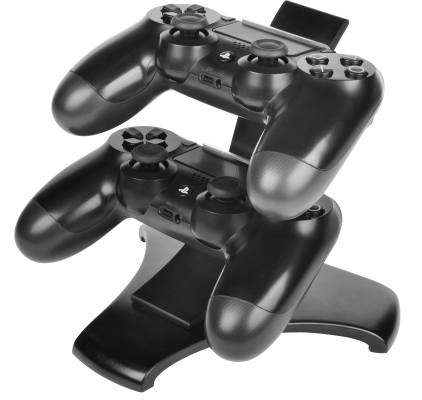

The DualShock4 is a big improvement from the DualShock3 and is an excellent controller. Not only does it have all that gamers need, but it is also quite ergonomic, feels solid, and has the best triggers. Despite all of the innovative features, there is one drawback of this controller; the battery isn’t too great as one would expect.
Many people have complained about batteries running out in just a short time, which is annoying especially when you’re deep into a game.
Yes, it is possible to use the controller while it is charging; however, this can be a problem if the cable isn’t long enough.
The best solution for this is to invest in a PS4 charging station, which is such a PS4 accessory that you must own if you consider yourself a serious gamer.
The best stations?
With new options being introduced every day, the following are some of the best-charging stations for you to go for:
-
Sony Move Charging Station
[easyazon_infoblock align=”center” cart=”y” cloak=”y” identifier=”B003O6G114″ locale=”US” localize=”y” tag=”gamerbolt-20″]
The charging station by Sony is an exceptional charging station which can be used not only for the DualShock4 controllers but also for the PS Move controllers. It doesn’t cost a lot and is the best option for those that have both the controllers. Since power is drawn from a wall outlet instead of your console, the charging is efficient and fast.
-
PowerA’s Charging Station
[easyazon_infoblock align=”center” cart=”y” cloak=”y” identifier=”B017IR2W5S” locale=”US” localize=”y” tag=”gamerbolt-20″]
Another great option for charging your PS4 controller is the DualShock4 charging station by PowerA. Apart from being compact, this charging station matches the style of the PlayStation and keeps the controllers charged and out of sight until your next gaming session.
So, if you are in search of an option that is more convenient and neater than the USB cable, then you must check out this charging station by PowerA.
But there are a few issues with this charging station you must know about. It is flimsy and lightweight, and you must line up the DualShock4 controller so that it clicks into place and starts charging.
The charging station works better on a table than it does inside a cabinet as you need to see what you are doing in order to line up the controller. Moreover, the AC adapter is also bulky and can cover up the neighboring outlet.
All of this, however, is offset by the fact that PowerA’s charging station is efficient at charging your controller, which is its primary function. Plus, it is comparatively cheaper than the other options.
-
Nyko Charge Base
[easyazon_infoblock align=”center” cart=”y” cloak=”y” identifier=”B00FLLFJ68″ locale=”US” localize=”y” tag=”gamerbolt-20″]
If you’ve placed your console in an entertainment center or in such a place where there is hardly any space to fiddle around then your best option is the charging base by Nyko. It is bigger than the charging station by PowerA and doesn’t have the same slick appearance.
However, putting the controller on ‘charge’ is as easy as tossing it on the charging base. It comes with white indicator lights to inform you that the controllers are charging. The white lights aren’t annoying at all, and nothing must ‘click’ into place for it to work.
But one drawback of this charge base by Nyko is that it comes with two small dongles that clip into the USB port present on top of the controller. Of course, these dongles don’t get in your way when you pull the triggers or plug in a headset. Moreover, they don’t fall off; however, there is a risk of losing the two small dongles which would render the charging base almost useless.
-
CEStore USB Charging Station
[easyazon_infoblock align=”center” cart=”y” cloak=”y” identifier=”B01GJII396″ locale=”US” localize=”y” tag=”gamerbolt-20″]
This dual USB charging station by CEStore is quite simple and easy to use. The charging station features two LED lights for indication purposes. The blue LED means that the controller has charged fully while the red LED indicates that the controller is charging. Putting the controller on charge and getting to know the status of its charge is very easy with this charging station.
-
Venom Twin Charging Station
[easyazon_infoblock align=”center” cart=”y” cloak=”y” identifier=”B073D25YNT” locale=”UK” localize=”y” tag=”gamerbolt-21″]
The twin charging system by Venom can completely charge a fully flat controller in just one hour. It may seem as if this is a long time; however, the time taken by this station for a complete charge is comparatively quite impressive considering the rest of the options available.
Venom’s twin docking charging station is quite a solid product which offers a great charging facility for the DualShock4 controllers. On the other hand, you will need another controller to play and charge at the same time. Plus, the cable that comes with the charging station measures only 0.5 meters long. This means that the station must be placed near your console.
So, if you have 2 DualShock4 controllers for your PlayStation 4, then this Venom docking station is the right option. The setup of this docking station is fairly easy while the dongles supplied with the charging station make using this station easy. All in all, this is a robust charging station which offers a quick and efficient charge.
